Registering Websites with Search Engines: Get Indexed Fast
Most advice about registering websites with search engines is stuck in 2012.
Founders still get told to “submit your site to Google” as if there's a magic form that makes traffic appear. There isn't. Google can usually discover sites on its own. The problem for a startup isn't eventual discovery. The problem is speed, trust, and visibility before momentum dies.
If you've just launched a SaaS product, AI tool, or side project, you need two things working together. First, the technical setup that gets your pages crawled and indexed. Second, the authority signals that help a brand-new domain look legitimate enough to rank, appear in AI-driven search surfaces, and get mentioned where buyers are already looking.
That's the core strategy behind registering websites with search engines.
Why "Registering" Your Site is the Wrong Goal for a Startup
The phrase itself is the problem.
Traditional search engine registration is a deprecated idea. Google doesn't need you to pay someone to “register” your domain, and services selling that promise often sit somewhere between outdated and scammy. The more useful distinction is this: old-school registration is mostly irrelevant, while directory submission for startup visibility is still highly practical. That distinction is clearly laid out in GreenMellen's explanation of why you don't need to register your site with search engines.
What matters now is not whether your site exists in a database. What matters is whether search engines and LLM-driven discovery systems can verify that your startup is real, relevant, and worth surfacing.
Indexing is plumbing. Discovery is distribution.
A lot of founders treat indexing like the finish line.
It's not. It's the minimum requirement.
If your homepage gets indexed but your domain has no reputation, no profile footprint, no backlinks, and no supporting citations, you've basically opened a store in an alley with no sign outside. Google knows you exist. That doesn't mean anyone will find you.
Here's the practical split:
| Layer | What it does | Why founders should care |
|---|---|---|
| Technical indexing | Helps Google and Bing crawl and store your pages | Without it, your site may stay invisible for longer than you can afford |
| Authority building | Gives your brand trust signals through reputable profiles and links | Without it, indexed pages often sit nowhere near the queries that matter |
Why this matters more for startups than established brands
An established company can survive slow discovery. A startup usually can't.
You launch with a tiny window of attention. Maybe you've got a Product Hunt launch coming. Maybe investors are Googling you. Maybe first users heard about you on X, LinkedIn, Reddit, or through ChatGPT. If they search your brand and see nothing except your own site, that's a weak trust pattern.
Practical rule: Don't aim to “register” your site. Aim to create a searchable footprint that says your company is real.
That's why founders should think in terms of technical inclusion plus brand validation. Search Console and Bing Webmaster Tools handle the first half. Directory profiles, reviews, and ecosystem listings support the second.
If you want a good example of how this broader visibility model is framed for startups, StartupSubmit's overview reflects the modern way teams think about discovery. Not as one submission. As a footprint.
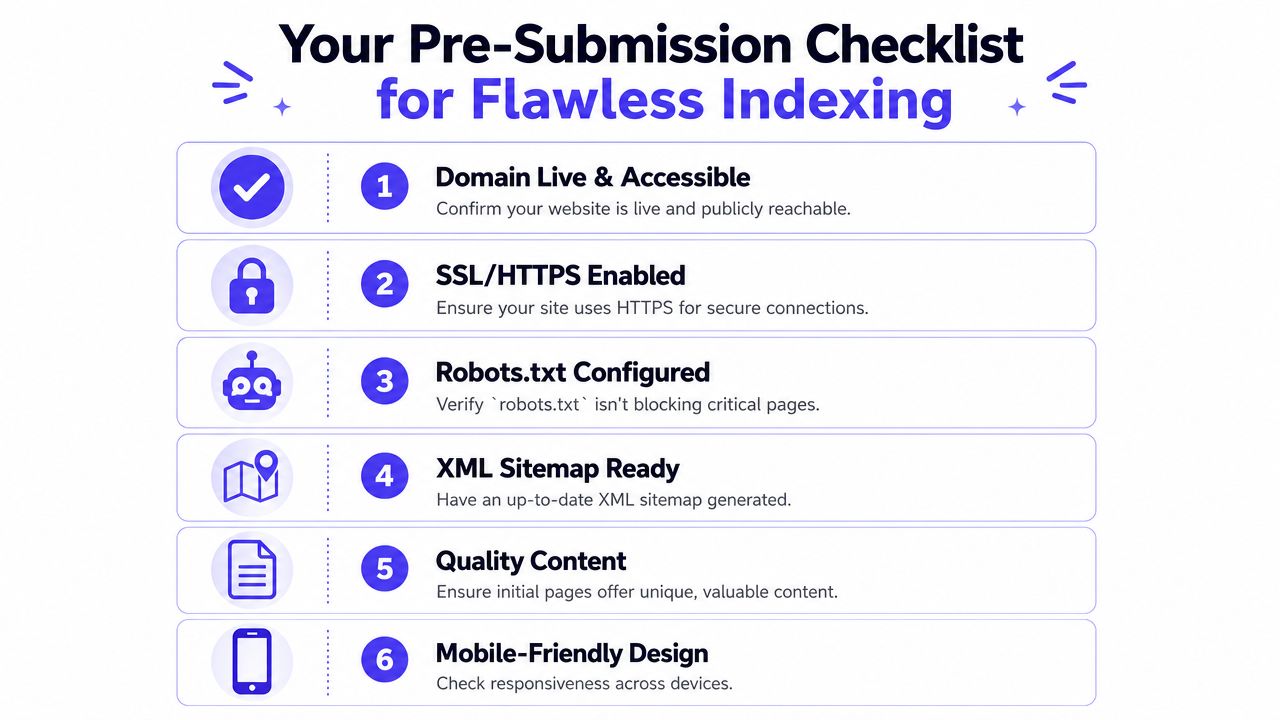
Your Pre-Submission Checklist for Flawless Indexing
Before you open Google Search Console, make sure your site is ready to be crawled.
Most indexing delays aren't caused by Google. They're caused by founders shipping a site that still has staging leftovers, thin launch copy, blocked pages, or a broken sitemap. Search engines can only index what they can access and understand.
This is the checklist I'd run before any launch.
Check the basics before the bots arrive
A crawler's first visit is brutally literal. It doesn't infer intent. It just reads what's there.
Run through these first:
- Domain is live: Open the site in a browser you aren't logged into. If it needs a password, search engines may hit the same wall.
- HTTPS works: Your preferred version should load securely and consistently.
- Canonical homepage works: Decide whether you want the www or non-www version as primary and keep it consistent.
- Navigation isn't empty: Crawlers need links to move through the site.
- Core pages exist: Homepage, product page, pricing or plans, about, and contact are usually enough to give a startup site a recognizable structure.
If you want a broader QA pass before launch, Trackingplan's website audit guide is a useful reference because it forces you to catch the boring implementation issues that create invisible SEO problems later.
Don't let one tag kill the whole launch
The most common self-inflicted mistake is leaving a noindex directive on key pages or blocking them in robots.txt.
That sounds technical, but the fix is simple. Check page source on your homepage and core pages. If you see a noindex directive, remove it unless you intentionally want the page hidden. Then review robots.txt and confirm it isn't blocking the pages you want indexed.
A startup site can look perfect in a browser and still be invisible to search if one leftover staging setting survives launch.
This happens more often than founders expect, especially after a fast rebuild, template swap, or handoff from a freelancer.
Make your sitemap useful, not decorative
Your XML sitemap should list the pages you want crawled.
That usually means live, indexable URLs. Not thank-you pages. Not duplicate variants. Not old test pages. If you use WordPress with an SEO plugin, Webflow, Framer, Wix, or most modern site builders, sitemap generation is usually built in. Still check it manually.
A clean pre-submission setup usually looks like this:
| Item | Good state | Bad state |
|---|---|---|
| Homepage | Public and crawlable | Password-protected or redirected strangely |
| Robots.txt | Allows important pages | Blocks the whole site or key folders |
| Meta robots | Index, follow on launch pages | Noindex left on from staging |
| Sitemap | Contains live canonical URLs | Includes junk pages or missing key pages |
| Content | Unique copy with clear purpose | Placeholder text or duplicated sections |
| Mobile layout | Readable and usable | Broken nav or layout shifts |
Give the first crawl something worth indexing
Indexing isn't just access. It's also judgment.
If your launch site has one vague hero section and a waitlist form, Google can crawl it, but that doesn't mean it will treat the page as useful. Make sure your initial copy explains what the product does, who it's for, and why it's different. The first crawl should encounter substance, not placeholders.
There's also a strategic upside here. If your early pages are clear, they're easier for Google AI Overview, ChatGPT visibility workflows, and other LLM SEO contexts to interpret later.
Founders focused on discoverability usually treat pre-submission as a product launch checklist, not an SEO afterthought. If you're thinking about the broader upside of getting this right from day one, the visibility benefits outlined here are the right lens.
Getting Your Website Listed on Google and Bing The Right Way
There's no point hunting for old “submit URL” forms. The modern workflow runs through Google Search Console and Bing Webmaster Tools.
That's the proper way to handle registering websites with search engines today.
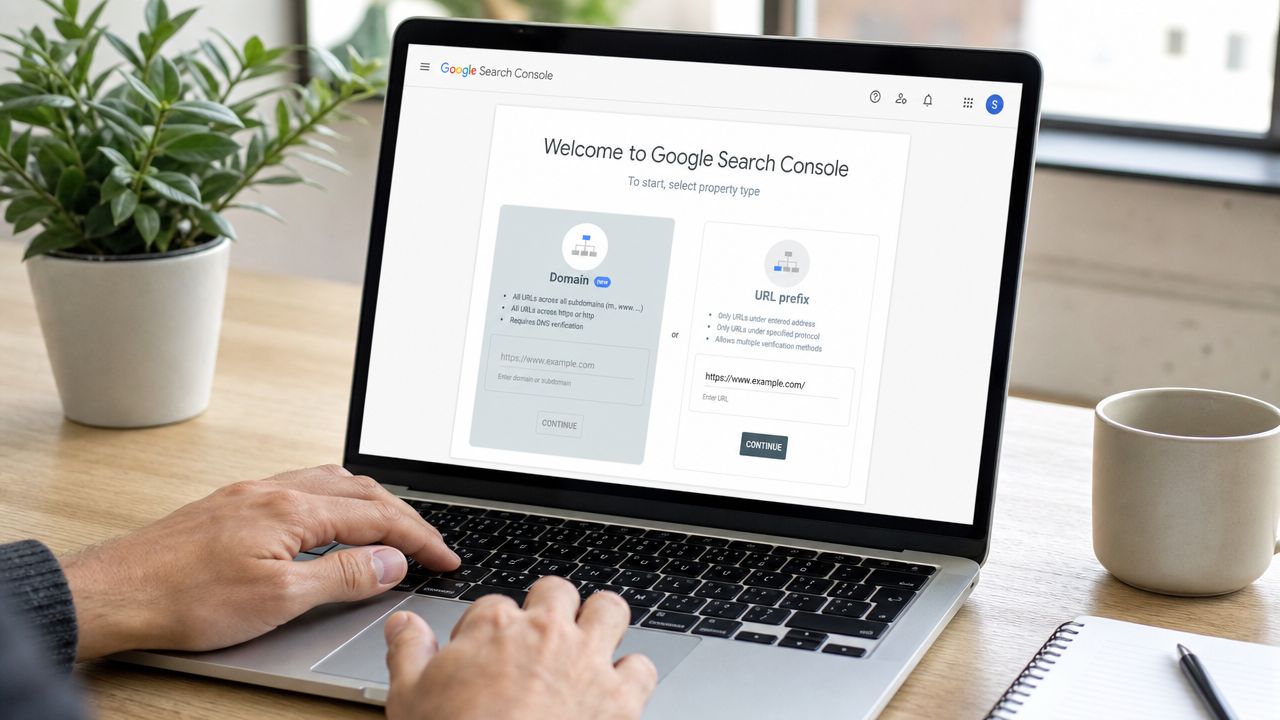
According to BT Business's guide to registering a website with search engines and improving ranking, the current method requires verification through Google Search Console using DNS, HTML file, or HTML tag methods, then sitemap submission through the Sitemaps tool. DNS verification is the most reliable option because it proves control at the domain level.
Google Search Console setup that won't break later
If I'm advising a founder, I push them toward the setup that creates the fewest future headaches.
Use this order:
- Open Google Search Console
- Add your property
- Choose URL prefix
- Pick DNS record verification
- Add the provided TXT record in your domain settings
- Wait for propagation
- Verify ownership
- Submit your XML sitemap
Why DNS over HTML file or HTML tag? Because site redesigns happen. Templates change. Frontend teams remove things. DNS-level verification tends to survive those changes better.
Bing still matters, even in a Google-dominant market
As of May 2025, Google holds about 89 to 90% of global search share, while Bing holds roughly 4%, according to Wikipedia's search engine overview. That's why most founders should optimize first for Google's ecosystem.
But “Google first” doesn't mean “Bing never.”
If you already have your sitemap, Bing Webmaster Tools is a low-effort extra step. It gives you another route into search visibility, another diagnostic surface, and a bit more control over how a new domain gets discovered.
The workflow founders should actually follow
Don't overcomplicate this. A clean launch sequence looks like this:
| Step | Tool | What you do |
|---|---|---|
| Verify ownership | Google Search Console | Confirm you control the site |
| Submit sitemap | Google Search Console | Point Google to your main crawl map |
| Repeat for Bing | Bing Webmaster Tools | Mirror the setup for Bing discovery |
| Inspect homepage | Google Search Console | Confirm Google can access the page |
| Inspect core URLs | Google Search Console | Check product, pricing, docs, and blog pages |
A few practical notes from doing this repeatedly:
- Use the final domain version: Don't verify one version and launch another.
- Submit your sitemap URL: Not a guessed path. Confirm it loads first.
- Start with your most important pages: Homepage, product pages, pricing, docs, integrations, and your first few content assets.
- Keep ownership access centralized: Founders often forget who owns Search Console after launch. That becomes annoying fast.
Founder shortcut: If you only do one technical thing after launch, set up Search Console properly and submit the sitemap the same day.
One more reason this matters. Search engines account for 68% of all website traffic globally, and Google drives 63.41% of web traffic referrals in the United States, according to Market.us web search engine statistics. For a new startup, that makes indexing setup less like admin and more like distribution infrastructure.
If you're building your startup's visibility stack from scratch, StartupSubmit sits in the broader ecosystem after this technical step. First get indexed correctly. Then work on authority.
Monitoring Your Site's First Steps into Search
Submitting a sitemap is the starting gun, not the finish.
This is the phase where founders usually either panic too early or ignore useful signals for too long. Both are mistakes. What you want is a short monitoring loop that tells you whether Google has seen the site, whether key pages are indexable, and whether you accidentally blocked yourself.
What timeline should a founder expect
The best benchmark here comes from practitioner data summarized in this video explanation of indexing timelines and pitfalls. It states that 99% of websites are eventually indexed, but time-to-first-index averages 4 to 10 days without GSC sitemaps versus 24 to 48 hours with them. It also notes that noindex or robots.txt blocks prevent 15 to 20% of new startup submissions from being indexed in the first week.
That's the reason to monitor right away. Not because indexing is mysterious, but because startup teams often ship avoidable errors.
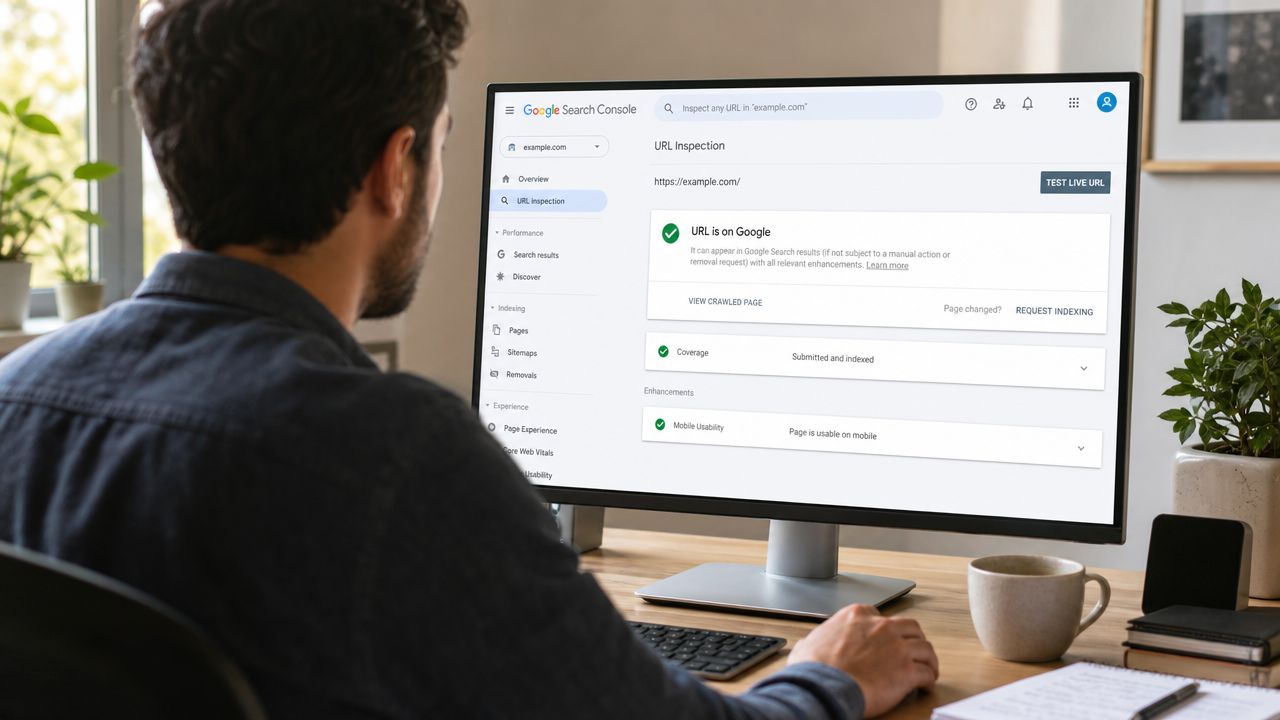
The three reports worth checking first
Don't get lost in every tab inside Search Console. For the first week, focus on these:
- URL Inspection: Paste in your homepage and critical pages. This tells you whether Google knows the URL, whether it's indexed, and whether the page is eligible for indexing.
- Pages or Coverage report: Look for statuses that hint at access or quality issues.
- Sitemaps: Confirm your sitemap was fetched successfully.
If your homepage isn't indexed yet, that isn't always a problem. If your homepage shows a clear block or fetch issue, that is a problem.
How to read the early warning signs
Here's a simple translation guide:
| Search Console status | What it usually means | What to do |
|---|---|---|
| Indexed | Google has stored the page | Move on to other key URLs |
| Discovered, currently not indexed | Google knows the page exists but hasn't processed it yet | Wait a bit, then review content quality and internal links |
| Crawled, currently not indexed | Google fetched it but didn't include it yet | Check whether the page is too thin, duplicated, or weak |
| Blocked by robots.txt | You told crawlers to stay out | Fix robots.txt |
| Excluded by noindex | The page is explicitly set not to index | Remove noindex if that wasn't intentional |
Don't obsess over ranking before you confirm indexation. A page that isn't indexed can't rank, no matter how polished the copy looks.
Pages to inspect manually
I usually tell founders to inspect these in order:
- Homepage
- Main product page
- Pricing page
- Docs or features page
- First blog post or launch announcement
Those pages shape how Google interprets the site's purpose.
If something looks off, fix the issue and request indexing again through URL Inspection. That won't guarantee immediate inclusion, but it does give Google a cleaner second pass.
One practical benefit of this process is that it forces discipline. You stop guessing. You stop searching your own brand every ten minutes. You use the data Google gives you.
If you're weighing whether DIY monitoring is enough or whether broader launch support makes sense, StartupSubmit pricing shows the kind of operational help some teams choose once they realize visibility takes more than one dashboard.
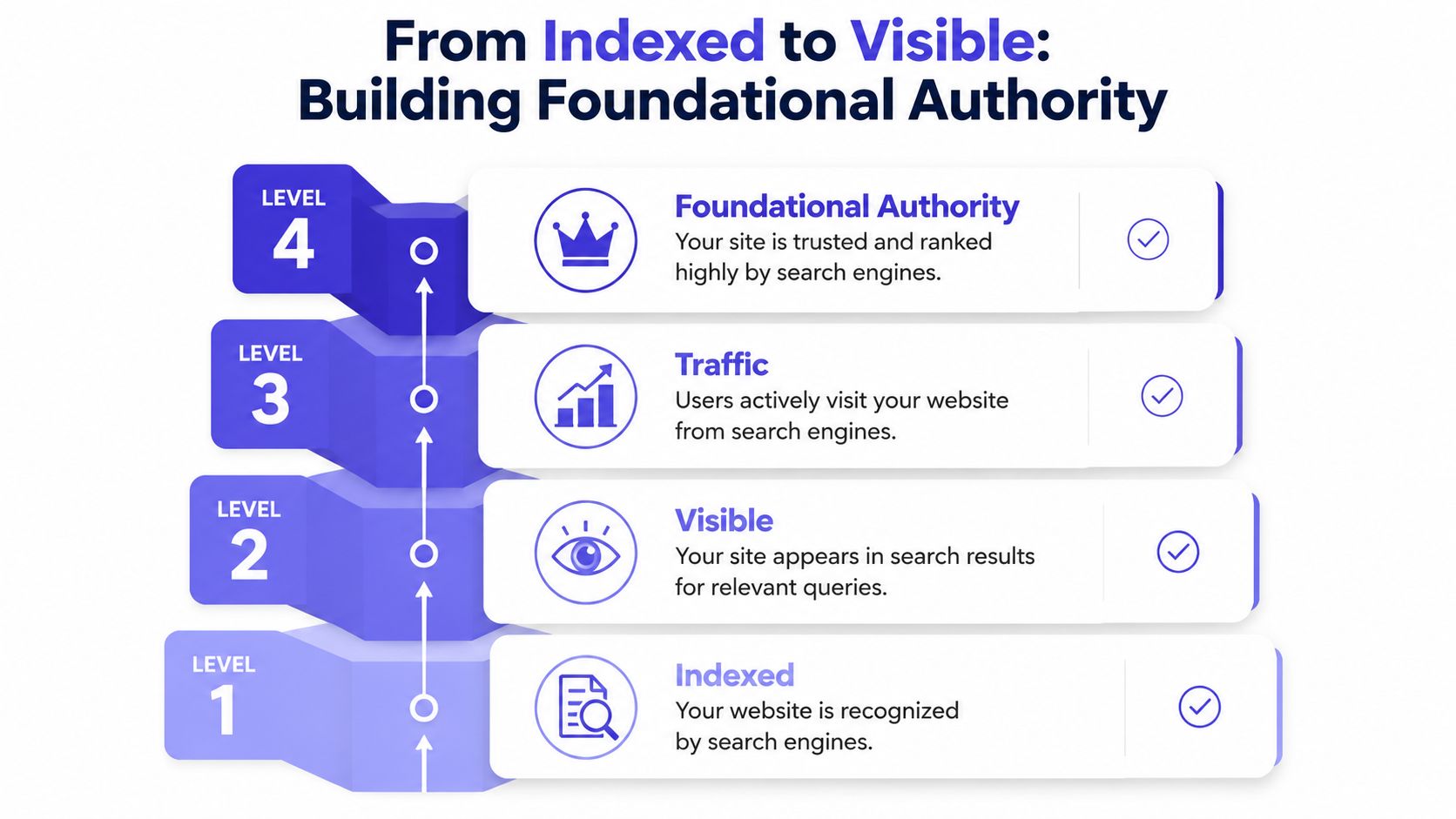
From Indexed to Visible Building Foundational Authority
An indexed site is eligible to appear. That's all.
A visible site has something else. Authority signals. For a new SaaS company, AI startup, or indie product, that usually means third-party profiles, backlinks, citations, and branded mentions that help search engines trust the domain.
Much startup SEO advice often falters. It gets founders to Search Console, then leaves them with the impression that Google will take it from there.
It won't.
Why directories still matter for startup SEO
Directory submissions get dismissed because people confuse spammy bulk directories with curated startup and software platforms.
Those are not the same thing.
A listing on Product Hunt, G2, Crunchbase, Capterra, AlternativeTo, SaaSHub, or Trustpilot does more than create a link. It gives your brand a traceable footprint across sites search engines already understand. That matters for classic SEO, for Google AI Overview visibility, and for the broader LLM SEO game where corroborating brand references help systems connect your company to a category.
According to Toolfio's guide on why software directories matter, manual submission to curated directories can deliver 50 to 100 dofollow backlinks in a single week. It also notes that these links act as direct votes of confidence to Google and remain one of the simplest ways to build a legitimate backlink profile.
The difference between good submissions and junk submissions
The founders who get value from directories don't blast generic descriptions everywhere.
They do a few things right:
- They customize profiles: Same company, but the wording is adapted to the directory's audience and category structure.
- They use real assets: Actual logo, screenshots, product description, and accurate categories.
- They keep NAP-style consistency where relevant: Brand naming, URL choice, and company description should line up.
- They prioritize reputable platforms: A small list of strong properties beats a giant pile of junk.
Here's the trade-off founders should think about:
| Approach | Upside | Risk |
|---|---|---|
| Manual curated submissions | Better fit, stronger profiles, cleaner backlink footprint | Takes founder time |
| Automated bulk blasts | Fast on paper | Low quality, moderation failures, spam footprints |
| No directory footprint | Saves time today | Weak trust signals tomorrow |
Your first backlinks shouldn't come from random websites nobody trusts. They should come from places a buyer might actually check.
Why this matters for AI search optimization too
Search discovery is no longer limited to ten blue links.
Founders now care about ChatGPT visibility, AI answer engines, and branded appearance in generated summaries. Those systems still benefit from the same underlying web signals: clear site structure, consistent entity references, and authoritative mentions across known domains.
That's why directory work and content work complement each other. If you're building topical coverage around your product and category, useful resources on BlazeHive's content generation uses page show how teams turn SEO content into a broader visibility engine rather than treating blog posts as filler.
For early-stage teams, this authority layer is usually where momentum starts. Not because directories are glamorous. Because they solve a hard startup problem: they help a brand-new company look less brand-new.
Practical Next Steps and Common Questions
If you want the short version, the workflow is simple.
Get the site crawlable. Verify it in Google Search Console and Bing Webmaster Tools. Submit the sitemap. Monitor indexing. Then build authority with credible external profiles and links.
That sequence works because each step solves a different bottleneck. Crawlability gets you seen. Submission gets you discovered faster. Monitoring catches technical mistakes. Authority building gives the site a reason to surface beyond branded searches.
A founder's first-week checklist
If your site just launched, do these in order:
Confirm the site is public and indexable
Check homepage access, robots.txt, and page-level index settings.Generate and review the XML sitemap
Make sure it contains only the pages you want discovered.Set up Google Search Console
Verify ownership and submit the sitemap.Set up Bing Webmaster Tools
Mirror the same setup so you're not leaving easy visibility on the table.Inspect the homepage and money pages
Product, pricing, docs, integrations, and your first content assets matter most.Create a short authority list
Pick the directories and profiles that fit your startup.Track what gets approved
Keep a basic sheet of links, profile statuses, and notes.
Common questions founders ask
Do I need to pay someone to register my website with Google
No.
You need to verify your site in Google Search Console and submit your sitemap. That's not the same thing as paying for “registration.” If someone sells search engine registration as a one-click SEO service, treat it carefully.
Why isn't my site showing on Google after submission
Usually one of four reasons:
- the page hasn't been indexed yet
- the page is blocked by noindex
- robots.txt is blocking it
- the page is too weak or too duplicate to prioritize
Symptom, cause, fix works well here:
| Symptom | Likely cause | Direct fix |
|---|---|---|
| Homepage not indexed | New site or blocked crawl | Use URL Inspection, confirm access settings |
| Important page excluded | Noindex tag present | Remove the tag and request indexing |
| Submitted but not appearing | Sitemap issue or thin content | Validate sitemap and improve the page |
| Brand search shows almost nothing | No external trust signals | Build profiles on reputable directories |
Should I submit every page manually
No. Submit the sitemap, then manually inspect and request indexing for the pages that matter most.
That usually means your homepage, product page, pricing page, docs, and one or two strong supporting pages. You don't need to babysit every URL unless the site is very small or a specific page is strategically important.
Is Bing worth the effort for a startup
Yes, because the effort is low.
Google deserves priority because that's where most search demand sits. But Bing Webmaster Tools takes little extra time, gives you another source of indexing insight, and helps cover more of the search ecosystem.
Do startup directories still help SEO
The right ones do.
Curated software and startup directories can help with backlinks, trust, entity validation, and branded search results. Low-quality directories are a waste of time. The job is to separate reputable platforms from clutter.
What should I write on directory profiles
Use a clear product description, real screenshots, correct category choices, your canonical site URL, and language that matches what your product does.
Don't stuff keywords into every field. You're not tricking a machine. You're helping platforms, users, and search systems classify the company properly.
How do directory submissions help with ChatGPT visibility and LLM SEO
They help create consistent references about your company across the web.
When multiple authoritative sites describe your startup in similar terms, it becomes easier for search engines and language models to connect your brand to a category, use case, or comparison set. That doesn't guarantee mentions, but it supports the kind of digital footprint AI systems can verify.
What mistakes should I avoid right after launch
These are the ones I see most often:
- Launching with placeholder copy that gives crawlers nothing meaningful to interpret
- Forgetting noindex settings from staging
- Submitting a bad sitemap full of junk URLs
- Assuming indexed means ranked
- Ignoring external profiles because they feel less urgent than product work
- Using spammy submission tools that create low-quality listings at scale
What should I do this week if I'm starting from zero
Keep it tight:
- verify the site
- submit the sitemap
- inspect key pages
- fix any crawl blocks
- create a shortlist of relevant startup and software directories
- publish or refine a few solid pages that explain the product clearly
That's enough to move from invisible to properly set up.
And if you already did the technical work, the next bottleneck probably isn't indexing. It's authority.
If you want help with the repetitive part after Search Console is set up, StartupSubmit handles manual submissions to startup and software directories for SaaS and AI companies. It's a practical fit for founders who don't want to spend days filling out profiles, checking duplicates, and tracking approvals across a long list of platforms.