
Submit Website to Directories Without Breaking Your SEO
The most common advice on how to submit a website to directories is to hit every site you can find. More listings, more links, more chance of ranking. That advice is how founders end up with two hundred profiles that disagree with each other.
A billing tool listed as invoice software in one place, accounts receivable automation in another, and a payments platform in a third does not look established. It looks unfinished. Buyers and search systems both try to match those pages to one company, and mismatched facts make the match harder.
I would rather keep twenty profiles accurate than chase a directory count. A placement is evidence that your company exists, with a stable URL and a clear category. It is not a ranking guarantee. The work that holds up is one data sheet, sites that fit your buyers, and a tracker you reopen.
Table of Contents
- Gather These Assets Before Your First Submission
- How to Vet Directories Before You Submit
- Keep Names, Taglines and Categories Identical
- How to Submit and Record Each Listing
- Fix Rejected Listings and Track What Stays Live
- Founder Questions About Directory Submission
- Run Your First Verified Batch This Week
Gather These Assets Before Your First Submission
Start with a data sheet, not a form. Every directory asks for roughly the same fields, and the first submission decides what those fields say for the next two years. Partial profiles get edited later, and every edit is another chance for a mismatch.
Confirm the canonical website URL first. It should load over HTTPS and should not bounce through a redirect that strips or adds parameters. Then lock the product name exactly as it appears in your app.
| Asset | Why directories ask for it | What to prepare |
|---|---|---|
| Canonical website URL | Every profile links to one destination | Final domain over HTTPS, no tracking parameters |
| Product name | Keeps the entity identical across profiles | Exactly as it appears in your product UI |
| Tagline | Short line shown in listing cards and search snippets | One sentence, kept well under 60 characters |
| Short description | Summary on directory browse pages | One or two plain sentences |
| Long description | Full profile page | 150 to 250 words of plain product facts |
| Category and subcategory | Places you on the right browse pages | Closest match from each site's own taxonomy |
| Keywords and use cases | Filter and tag fields | Five to eight terms buyers actually use, no stuffing |
| Pricing model | Shown on the profile and read by evaluators | Free tier, usage-based or per-seat, stated plainly |
| Logo and screenshots | Visual identity and proof of the product | Square logo file and two to four current screenshots |
| Founder name and contact email | Ownership checks and verification emails | A monitored inbox, not a throwaway address |
The long description is the page people read. Write what the product does, who it is for, and how pricing works. Skip slogans. Keywords should be terms a buyer would type, tied to real use cases, not a stuffed list.
If you want ChatGPT search to have a chance of surfacing your pages, check robots.txt for OAI-SearchBot. OpenAI's crawler docs identify OAI-SearchBot as the crawler used to surface websites in ChatGPT search, and sites that opt out will not be shown in those answers, though they may still appear as navigational links. Allowing the crawler makes you eligible for discovery. It does not guarantee a citation. Confirm your host allows OpenAI's published crawler ranges, and confirm the canonical domain, docs, pricing, and comparison pages return normal responses.
Fill every blank on the sheet before you submit anywhere. A missing logo or a throwaway email is how a clean listing turns into a second, slightly different one.
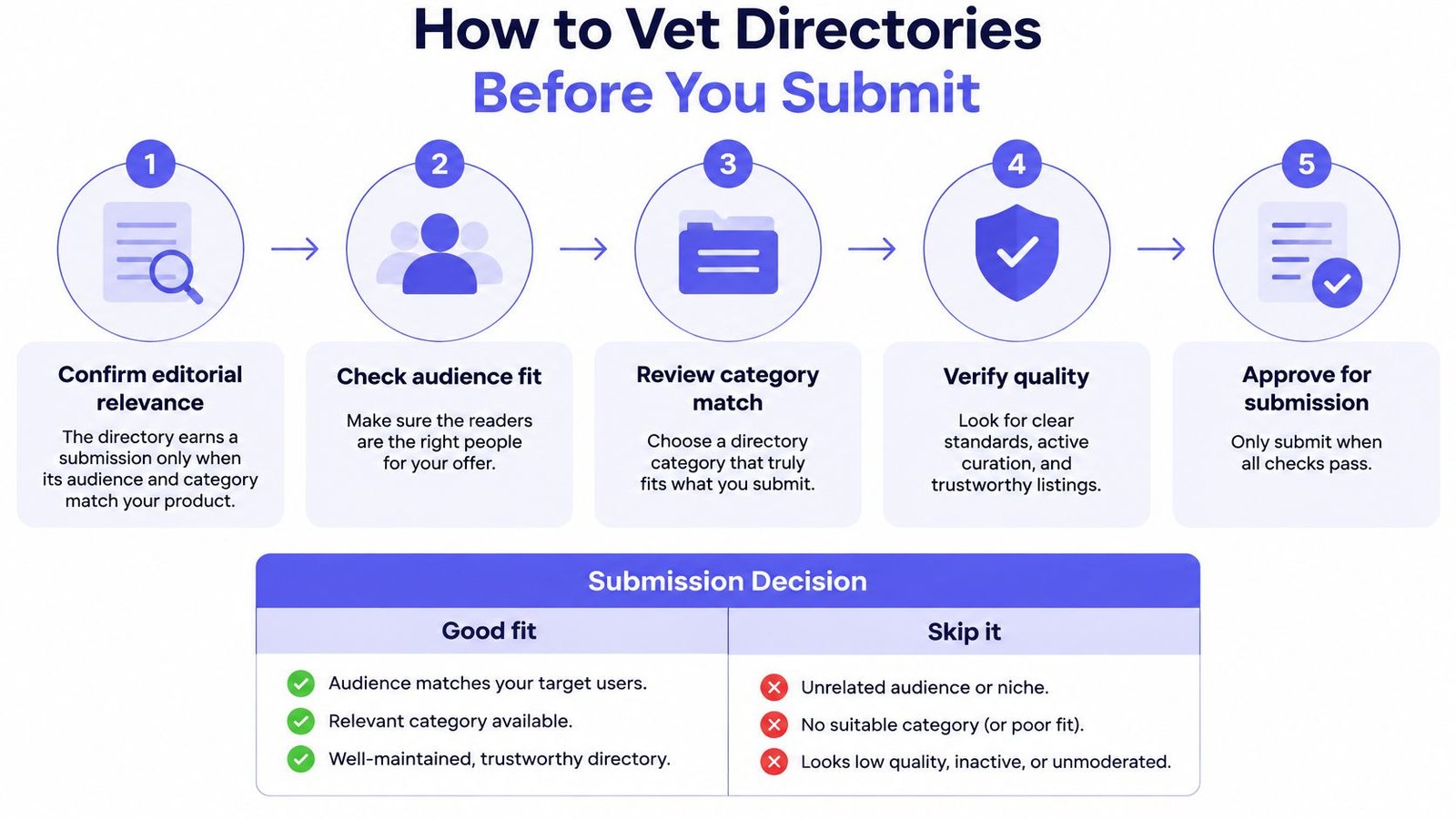
How to Vet Directories Before You Submit
A directory earns a submission only when its audience and category match your product.
Run these checks in order, and drop the site as soon as one fails.
- Confirm editorial relevance. Browse the category and read two or three live profiles from companies like yours. If those pages are thin ads with no product detail, leave.
- Check indexing. Search for a sample profile and confirm it appears with unique company text, not a copied tagline. An unindexed page will not help discovery.
- Read the rules. Note moderation, duplicate handling, and link attributes. Google's spam policies name low-quality directory links and automated link-creation services as link spam, and paid or sponsored links should use
rel="nofollow"orrel="sponsored". - Search for an existing profile. Claim or update it if you find one. A second account creates the duplicate you will spend a month cleaning up.
- Write a one-line reason next to each directory you keep. If you cannot say who on that site would look you up, cut it.
We check each directory before submitting, and if the business is already listed there, we skip that directory and use another relevant one where available. That is the same rule you should follow by hand.
| Directory type | Examples | Good fit when | Watch for |
|---|---|---|---|
| Software review platforms | G2, Capterra | Buyers in your category compare tools and read reviews | Review-request schemes that break platform rules |
| Alternatives and comparison sites | AlternativeTo, SaaSHub | Your product competes with tools people already name | Listings you cannot claim or edit |
| Startup launch and discovery | Product Hunt, BetaList, Indie Hackers | Your audience is founders, makers and early adopters | Dormant sections with no recent activity |
| Company data profiles | Crunchbase | Investors, partners or recruiters will look up your company | Funding, team or location data that is out of date |
For a SaaS tool, review platforms, comparison sites, and launch communities are usually the strongest fits. A launch community with no posts in months fails the same test as an unindexed profile.
Practical rule: Measure the share of approved, indexable, nonduplicate profiles on relevant sites. Raw submission count is not a quality benchmark.
A directory shortlist for early-stage founders is a better starting point than a scraped list of 200 names. Finish with 15 to 30 directories you can check. Cut anything that fails the index test or the link-attribute test.
Keep Names, Taglines and Categories Identical
Pick one name, one tagline, and one category, then lock them.
Say an invoicing product is "Northstar" in the app, "Northstar Billing" on G2, and "Northstar AI" on a launch site. A buyer comparing those three pages has to decide whether they are one company. Search systems do the same matching across pages. Split names split the entity.
Keep these identical on every profile:
- Product name: the string in your UI, including capitalization.
- Tagline: the same short line, not a rewritten slogan per site.
- Category: the same buyer-facing label, mapped to each site's closest taxonomy term.
- Founder names, pricing description, and canonical URL: same facts, same destination.
What can change is the description, and only in two ways. Length, so you fit the character limit. Tone, so it suits the reader on that site. A G2 evaluator wants the workflow and the pricing model. A Product Hunt visitor wants what shipped and who it is for. Lead with that reader's question, and leave the facts alone.
Do not paste your primary keyword into every paragraph. A description that says "best AI SEO tool" on eight sites reads as spam to a human and gives a moderator a reason to remove the profile.
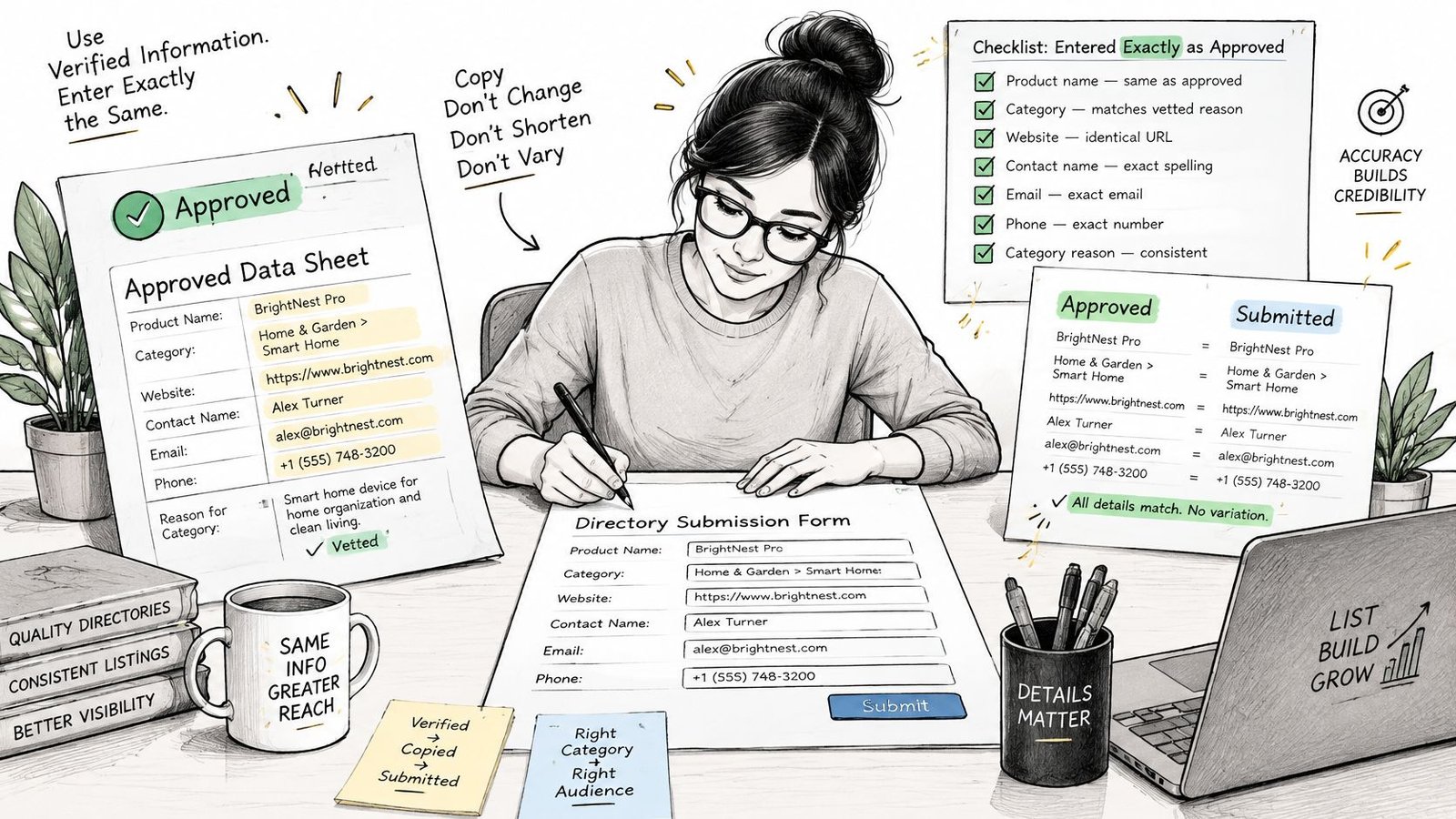
Store the master copy in one document and log which length went to which site. When pricing changes, update every live profile in the same week. A reader who opens five profiles should see the same product five times, with the same logo file.
The same lock applies if you add manual citation listings for AI tools. A citation with a shortened name or an old pricing line undoes the consistency you just set.
Boost Your Startup's Traffic & SEO with up to 200+ Directory Listings
Skip the grind. Our team manually submits your product to relevant, high-authority directories, with screenshot proof for every submission, so you get real users, feedback and lasting backlinks without lifting a finger.
Get Listed TodayHow to Submit and Record Each Listing
Submit from the approved sheet. Do not retype the product name from memory.
- Paste each field exactly. Open the sheet beside the form. A retyped name picks up a hyphen or an extra word, and that variation becomes the public record.
- Match the category to your vetting note. If the site's menu does not offer the reason you wrote down, stop and pick a closer category or skip the site.
- Trim the short description to the limit. Change length and tone only. Do not add a new claim to fill the box.
- Upload the current logo and screenshots. Use the format the form requests. An old screenshot of a retired UI is a trust problem, not a design nit.
- Create the account on the shared founder inbox. Verification mail has to survive when someone leaves the team. A personal Gmail does not.
- Submit, then screenshot the confirmation before you close the tab. Many confirmation pages never load again.
- Open the verification email inside its window, then view the live profile in a private window. You want a public page that loads without a login.
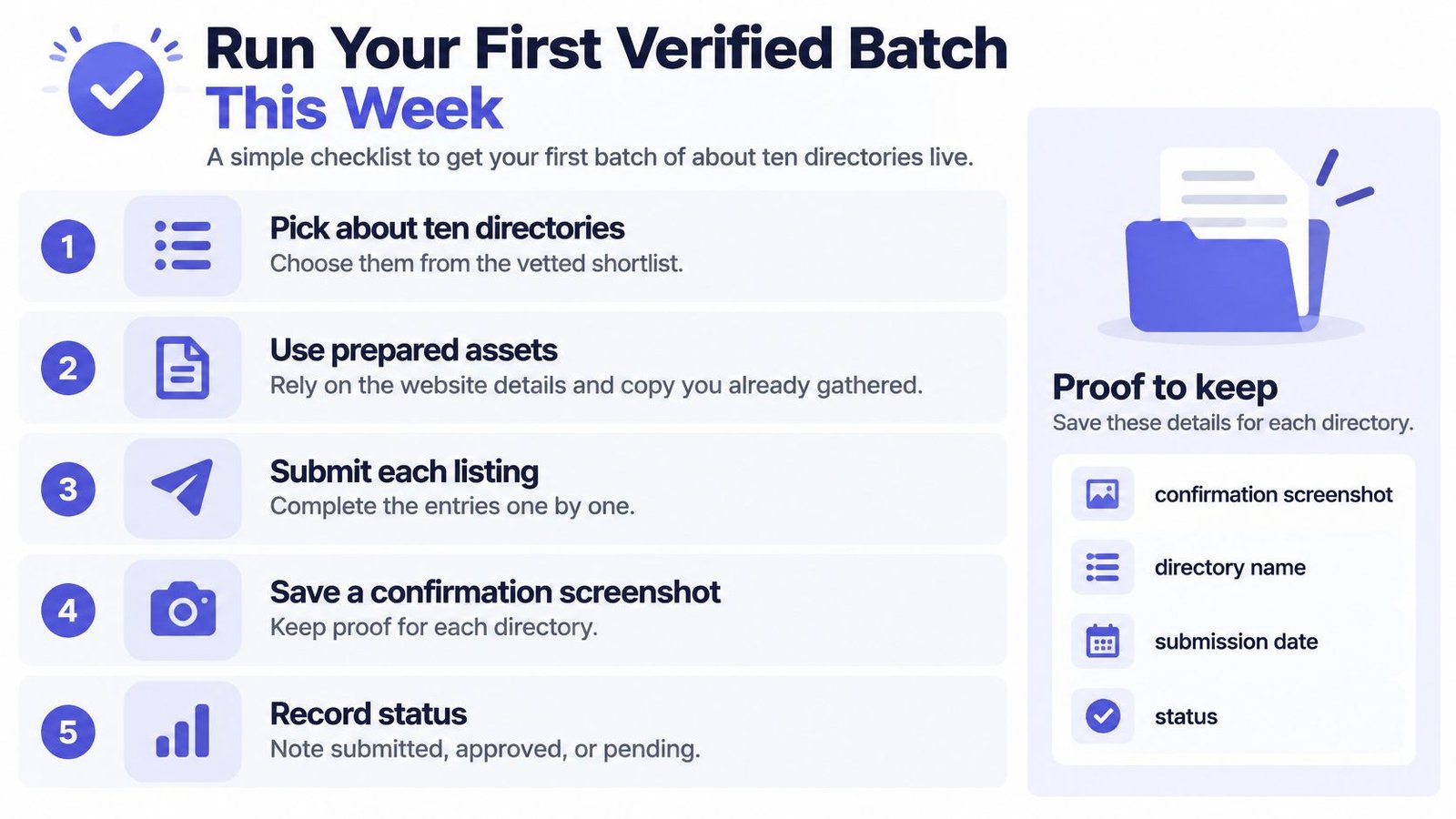
- Log the live URL, status, category, anchor text if shown, link attribute if visible, date, and login in one tracker.
Some directories email the address on the form. We tell customers which ones to expect so those messages are not treated as noise. If you submit yourself, read each site's help page for the same detail. A missed email is the usual reason a submission sits in limbo for weeks.
Status in the tracker should say submitted, approved, or pending. "Done" hides the difference between a form you sent and a page a stranger can open.
If you would rather not run the tracker yourself, how StartupSubmit handles directory submissions is the manual version of this same sequence: category fit, no duplicate profiles, and a record you can audit.
Fix Rejected Listings and Track What Stays Live
A rejection email starts the cleanup, and the stated reason is usually the whole job. Fix that one cause, then resubmit once. An identical second attempt fails for the same reason the first one did.
A launch-platform profile came back rejected because the submitted URL carried a tracking parameter. Stripping the parameter and resubmitting cleared it within an hour. The copy never needed a rewrite. The destination did.
Triage duplicates and dead pages
For duplicates, claim the older profile, update it from the master sheet, and ask the directory to remove the extra one. Log both URLs so the audit never counts them twice.
For a removed or deindexed listing, check three things. Does the page still return a successful response? Has it picked up a noindex tag in the page source, or has the link flipped to nofollow? Has the directory closed or changed its policy? Contact the directory once. If it stays silent, drop the placement from the active list. Give each listing two attempts, then move on; beyond that, the time is better spent on profiles that answer.
Google's Search Essentials treats helpful, reliable content and technical discoverability as the baseline, and a directory workflow only pays off when every listing reinforces one entity and sends people to the correct canonical URL. Inconsistent names, pricing claims, or positioning create trust problems that a bigger submission count will not fix. 200 listings can be worse than 20 carefully maintained profiles when the mass set is duplicated, outdated, or thin.
A submission count shows effort. Results show up in what stays live. Low-quality directory links and automated link creation are the pattern spam systems are built to discount, so volume can mislead you. Give new placements a few weeks to settle, then recheck each profile monthly.
Score what stays live
| Metric | How to measure it | Healthy sign |
|---|---|---|
| Acceptance rate by tier | Approved listings divided by submissions, grouped by directory type | Most submissions approved on relevant sites |
| Indexed-placement rate | Share of live profile URLs found in Search Console or an independent crawler | Most live profiles indexed within weeks |
| Unique referring domains | New linking domains counted in a backlink index | Steady monthly growth without sudden spikes |
| Referral sessions | Analytics referral traffic from each profile URL | Visits from directories that match your buyers |
| Branded search coverage | Page-one results for your company name | Your own site and reputable profiles appear together |
| Profile accuracy | Monthly check of name, pricing, URLs and screenshots | No stale or contradictory fields |
Accuracy sits last in the table and drives the rest. A listing that still shows old pricing or a dead URL works against the consistent entity every other profile is trying to build.
Ahrefs' study of about 920 million pages found a clear positive correlation between the number of referring domains and organic traffic, and the same analysis warns that the correlation does not prove ranking causality. A profile that is live, indexed, and accurate still counts even when it never moves a ranking.
If you also want the company to appear as a verified business inside ChatGPT's own directory, the seopaslaugos.io business listing guide walks through claiming that profile separately from ordinary software directories. Keep it factually aligned with everything else you maintain.
Founder Questions About Directory Submission
How many directories should a SaaS submit to?
Build a shortlist of 15 to 30 that match your category. Twenty accurate, maintained profiles beat a pile of duplicates you cannot update after a pricing change.
Are paid directories worth the money?
Pay only when the audience matches your buyers and the listing is a stable, indexable page you can edit. Check the link attribute before you pay. A sponsored link with the right attribute can still be a useful profile. It is not a ranking purchase.
Will directory listings put my product into Google AI Overviews?
Not directly. Google's AI features documentation says AI Overviews and AI Mode use a query fan-out across subtopics, and supporting pages must already be indexed and eligible for ordinary Search with a snippet. Profiles help only as corroborating brand references, and only when they are crawlable and consistent with your site.
Do I need to change robots.txt for ChatGPT?
Allow OAI-SearchBot if you want a chance to appear in ChatGPT search answers. Opting out keeps you out of those answers. Allowing the crawler makes the site eligible. It does not guarantee a citation.
How long before a listing shows up?
Many approved profiles appear in search within weeks. Recheck at 30 to 90 days. Indexing is the milestone, not the approval email.
Should I use a managed service?
Choose one if you will not maintain the tracker. Ask for every submitted URL, a screenshot per directory, and the login for each account, so you still control the listings. A manual directory submission for SaaS should report status as submitted, not as guaranteed live.
Run Your First Verified Batch This Week
Pull ten directories from the shortlist you already vetted and work through them with the asset sheet open. Save a confirmation screenshot for each submission and log the live URL the same day, while the page is still fresh. Book the 30-day recheck before you close the tracker.
Keep the batch small until that recheck happens. Early referral visits show which directory types your buyers really open, so a second batch built on that evidence beats a large one built on guesses. Free launch and comparison sites are a sensible first ten when budget is tight, and a list of no-cost directories for SaaS launches fills the batch without paying for placements you have not tested.
If you would rather hand the forms off, our one-time plans are Starter at $99 for 60+ directories, Growth at $199 for 150+, and Authority at $299 for 220+. Intake collects the assets from your sheet. The report lists every submitted URL and a screenshot for each directory, so you can verify each placement. The guarantee covers the number of submissions in the plan, not acceptance by every directory. Status is reported as submitted, not guaranteed live.
Either route works when the data stays consistent and the tracker stays current. Ten accurate profiles you can reopen and update next month are a stronger SEO asset than a folder of confirmation emails nobody audits.
StartupSubmit is a manual directory submission service for SaaS and AI startups. We draw from a database of 500+ curated high-authority directories, submit only to the ones that fit your category, and skip any platform where you are already listed. You get back the URLs and screenshots so you can verify every placement. If you want that first verified batch handled for you, start at StartupSubmit.
Ready to build high-quality backlinks?
We'll manually submit your product to 60 to 200+ directories in 5 to 7 days, with screenshot proof for every submission. No bots, no boring forms, just more time for selling and building.
See pricing & get started →