Technical SEO for SaaS: The 2026 Founder Playbook
A founder opens the homepage in Chrome and everything looks polished. The headline appears instantly, the pricing cards animate into place, and the navigation works exactly as expected. Then Google Search Console shows that the pricing page isn't indexed, the feature pages are missing from search, and the rendered snapshot looks like an empty shell.
That gap between what a browser displays and what a crawler can access, render, and understand is where SaaS growth stalls. Technical SEO for SaaS closes that gap across the marketing site, product pages, documentation, help center, and application routes.
SaaS websites create a distinct set of problems. A single brand may operate a public marketing site, an authenticated application, a documentation portal, a help center, changelog pages, integration directories, and parameterized product routes. Each surface has different rendering rules and different SEO value. A generic checklist borrowed from ecommerce won't tell you whether your dashboard is consuming crawl attention, whether Google sees your pricing copy, or whether your docs are competing with commercial pages.
Why Technical SEO Breaks Differently for SaaS Sites
The browser isn't the search engine. A user waits for JavaScript, API calls, animations, and client-side routing to finish. A crawler has to discover links, fetch resources, render the page, and decide whether the resulting document deserves a place in the index. If the critical headline, product explanation, pricing details, or internal links only appear after fragile client-side execution, your best page may be technically live but practically invisible.
That's why technical SEO for SaaS is less about polishing isolated tags and more about controlling the public surface area. Google should encounter the pages that support acquisition, not private dashboards, API responses, internal search results, or thousands of URL variations. The architecture needs to make that priority obvious.
Google defines crawl budget as the combination of crawl capacity and crawl demand, the number of URLs Google can and wants to crawl. Its guidance also identifies only two ways to increase crawl budget, add server resources when host capacity is the constraint, or improve content quality for the relevant Google product. That makes server performance, page quality, and information architecture connected parts of the same SEO problem. Google's crawl budget guidance for SaaS explains why rapidly expanding launch pages, docs, and parameterized URLs need deliberate control.
The SaaS surfaces that need different treatment
- Marketing pages: These should expose complete HTML, clear navigation, structured data, and strong conversion paths.
- Product and feature pages: These are public commercial assets and deserve the strongest rendering and internal-linking treatment.
- Authenticated application routes: These usually have no search value. Keep them behind authentication and out of the index.
- Documentation and help centers: They can attract valuable discovery traffic, but their templates often generate pagination, tags, versions, and search URLs.
- Changelogs and public resources: These need a clear policy because some entries support discovery while others are too thin or temporary to rank.
Practical rule: If a page can generate a trial, demo, signup, or qualified product discovery, treat it as a first-class SEO route. If it only serves logged-in users, don't let it compete with those pages.
Start with the foundations of search engine optimization if you need a broader technical framework, then apply it through a SaaS-specific lens. You can also use startup directories as part of the wider discovery strategy, but directory visibility can't compensate for a site that exposes the wrong URLs or hides its money pages from crawlers.
Crawl Budget and What It Actually Means for SaaS
Crawl budget isn't a quota you can casually calculate from your site size. Google describes it as the relationship between how much crawling a host can support and how much crawling Google considers worthwhile. For SaaS companies, the practical issue is usually waste. Dynamic applications generate many URLs that exist technically but have little or no search value.
A crawler might enter through the homepage, follow a visible link into an app route, encounter internal filters, then discover query-string variations, session identifiers, internal search results, and paginated documentation. Those URLs compete for attention with pricing, feature, comparison, and integration pages. A clean XML sitemap won't fix a site whose internal link graph keeps sending crawlers toward low-value routes.
The common worked example is useful as a prioritization model, not as a Google allocation rule. If a hypothetical crawl session contains 50 requests, and 40 are spent on app routes or URL variations, only 10 remain for the pages that support pipeline. Those figures are illustrative, not a benchmark. The allocation depends on Google's assessment of the host and URL set, so don't treat the example as a promise about your own crawl behavior.
Where SaaS crawl budget typically leaks
| URL Pattern | % of Crawl Budget | Indexable? | Recommended Action |
|---|---|---|---|
| Authenticated dashboard routes | Illustrative allocation only | No | Require authentication and keep private routes out of the index |
| Internal search URLs | Illustrative allocation only | No | Apply template-level noindex and exclude them from sitemaps |
| Filter and sort parameters | Illustrative allocation only | Usually no | Canonicalize useful variants, control heavy combinations |
| Session and tracking parameters | Illustrative allocation only | No | Canonicalize to the clean URL and remove unnecessary internal links |
| Paginated documentation | Illustrative allocation only | Depends | Keep useful pagination crawlable, but prevent duplicate template variants |
| Public pricing and feature pages | Illustrative allocation only | Yes | Link prominently and include canonical, indexable versions in sitemaps |
The table deliberately avoids pretending that Google assigns a fixed percentage to each pattern. No verified source provides those percentages. Use your own server logs, Google Search Console crawl data, and crawler exports to identify the actual waste.
A practical cleanup order
- Separate the app from public acquisition routes. If the application runs on
app.example.com, give it an indexation policy of its own. Authenticated routes should not be part of the public discovery graph. - Remove junk URLs from internal links. A canonical tag is weaker than never linking to the filtered version in the first place.
- Control internal search and parameter templates. Don't let every query become a crawlable page.
- Keep XML sitemaps selective. Submit canonical, indexable, successful URLs that matter to the business.
- Strengthen money-page links. Pricing, feature, integration, and comparison pages should be reachable from navigation, relevant hubs, and contextual content.
Google also states that it can only crawl links implemented as standard HTML anchor elements with an href attribute. A button that triggers JavaScript navigation may work perfectly for users while providing a poor discovery path for crawlers. Audit rendered HTML, not just the interface.
Rendering Strategy for JavaScript-Heavy SaaS Stacks
Rendering is an architectural decision, not a late-stage speed tweak. The same React, Vue, or Next.js stack may power a public pricing page and a private dashboard, but those routes have completely different SEO requirements.
A 2024 JavaScript SEO analysis from Vercel and MERJ examined more than 100,000 Googlebot fetches. It found that 100% of valid HTML pages were fully rendered by Google, yet the delay was highly uneven. The median delay was about 10 seconds, the 75th percentile about 26 seconds, and the 90th percentile close to 3 hours. The 95th percentile was around 6 hours, while the 99th percentile reached around 18 hours. The 2024 JavaScript SEO analysis shows why “Google can render JavaScript” isn't the same as “Google sees every page immediately.”
A separate 2019 research summary found indexing problems on more than 30% of JavaScript-powered pages, which reinforces the operational lesson. Rendering may succeed eventually, but delays and failures can affect launch pages and fast-changing product content when timing matters.
Rendering strategy by SaaS route type
| Route Type | Recommended Rendering | SEO Impact | Risk if Wrong |
|---|---|---|---|
| Homepage and core marketing pages | SSR or SSG | Full content and links arrive in HTML | Empty shell, delayed discovery, unreliable indexing |
| Pricing pages | SSR or SSG | Pricing and offer context are immediately available | Google may miss plan details or index a weak version |
| Feature and comparison pages | SSR or SSG | Commercial intent is clear at first fetch | Ranking and launch visibility can lag |
| Documentation and changelogs | Usually SSG, with SSR where content is dynamic | Fast, stable content delivery | Pagination and client-side content may be missed |
| Authenticated dashboard | CSR behind authentication | SEO should be irrelevant | Public exposure can waste crawl attention and create privacy risk |
| User-generated public pages | SSR or pre-rendering, only when intentionally indexable | Supports discovery when content has standalone value | Thin or duplicate pages can expand the index unnecessarily |
The split that works
Use server-side rendering for public pages that change based on request context, such as localized or personalized marketing experiences. Use static site generation for documentation, changelogs, and comparison pages that can be rebuilt when content changes. Keep client-side rendering inside the authenticated product where search visibility isn't part of the user journey.
The mistake is applying the app's CSR model to the marketing site because it reduces implementation friction. That decision often creates a future SEO dependency on rendering queues, JavaScript reliability, and third-party crawler behavior.
Test the route in three ways:
- View source: Confirm the primary headline, product description, canonical, and important links exist in the server response.
- Rendered HTML: Use Google Search Console URL Inspection and compare the rendered output with the live page.
- JavaScript-disabled browsing: If the main copy and navigation disappear, your public route needs a rendering change or a pre-rendering bridge.
Site Architecture, Subdomains, and Where Your Pages Live
A SaaS site needs a clear boundary between public acquisition, authenticated product functionality, and support content. A simple three-tier model usually works:
- The root domain hosts the marketing site, pricing, features, solutions, integrations, comparisons, blog, and other pages intended to rank.
- The application lives behind authentication, often at
app.example.comor a controlled/apppath. - Documentation and support content lives at
/docs,/help,help.example.com, or another deliberately managed property.
The exact host matters less than the policy. A subdomain isn't automatically bad, and a subfolder isn't automatically good. The right decision depends on whether you need shared infrastructure, separate authentication, independent deployment, or maximum consolidation of public content.
Domain versus subdomain decision matrix for SaaS properties
| Criterion | Subfolder, /app, /docs |
Subdomain, app., help. |
|---|---|---|
| Link equity consolidation | Keeps public content under one host | Requires clearer cross-property linking |
| Cookie and tracking separation | More complex when systems share a host | Cleaner separation between app and marketing systems |
| Infrastructure flexibility | May require routing or reverse-proxy work | Easier to deploy independently |
| Authentication boundaries | Can be harder to isolate safely | Usually clearer for private applications |
| Brand experience | Feels tightly unified | Still branded, but users may perceive a separate property |
| Best fit | Blog, public resources, and rankable content | Authenticated app or technically independent support system |
Use subfolders for the blog and other public content when your platform can serve them reliably from the main domain. For docs, choose a subfolder when the tooling integrates cleanly and the pages benefit from consolidated navigation. Choose a subdomain when the help platform, authentication model, or deployment needs genuine separation.
Do not let convenience create an accidental SEO hierarchy. The navigation should lead with the pages that support revenue, not with the dashboard. Link from the homepage to pricing and primary product hubs. Link from each feature page to related use cases, integrations, comparisons, and the relevant conversion path. Keep docs links useful, but don't allow a massive support taxonomy to dominate every global template.
Build a URL taxonomy before scaling pages
A scalable SaaS taxonomy gives each page type a distinct job:
/features/[feature]for product capabilities/solutions/[use-case]for jobs to be done/industries/[industry]for vertical applications/integrations/[partner]for ecosystem searches/compare/[product]-vs-[competitor]for direct evaluation/alternatives/[competitor]for category-switching intent
The naming convention matters because it prevents teams from publishing multiple pages for the same intent under different campaign structures. Before creating a new page, assign its intent, parent hub, canonical URL, internal-link targets, and sitemap group.
For broader discovery, founders can also review free startup directories, but the listing strategy should follow the same rule as site architecture. Choose relevant categories and accurate descriptions rather than creating disconnected profiles everywhere.
Canonicalization, Noindex, and Indexation Control
SaaS teams usually accumulate duplicate URLs through product launches, experiments, pricing logic, localization, and documentation systems. The solution isn't to add a canonical tag everywhere and hope Google obeys it. You need a policy that maps each URL condition to one control.
Choose the control based on the URL's purpose
Use a self-referential canonical when the page is a legitimate public page that should remain indexable. Every clean feature, pricing, integration, and article URL should identify itself as canonical. Parameterized versions should generally point to the clean URL when they contain substantially the same content.
Use noindex when crawlers may access a page but the page shouldn't appear in search. Internal search results, thin signup variants, private marketing utilities, and selected duplicate templates often belong here. Keep the page crawlable long enough for search engines to see the directive.
Use robots.txt restrictions for crawl control when a route contains private or technically irrelevant material that doesn't need to be fetched. Don't rely on robots.txt alone to remove a page from the index, because a blocked crawler may never see the page-level noindex directive.
SaaS duplication patterns that need decisions
- Persona variants: Separate pages for different audiences can be useful when the problems, workflows, and proof are different. If only the audience label changes, consolidate or choose a clear primary page.
- Pricing locales and currencies: Create distinct indexable versions only when the content and audience justify them. Otherwise, avoid generating a separate crawlable URL for every display variation.
- Paginated docs and changelogs: Don't automatically canonicalize every page back to the first page. Deeper pages may contain unique links and content that crawlers need to reach.
- Trial and signup URLs: Keep transactional routes out of the index when they duplicate the main conversion page or provide no independent search value.
- UTM and session parameters: Canonicalize to the clean URL and remove parameterized variants from internal navigation.
Canonical chains create avoidable ambiguity. A canonical should point directly to the final, indexable URL, not to a redirect, another canonical, or a page with a conflicting directive.
Audit the policy, not just the tags
Run a crawl with Screaming Frog or a similar tool and export canonical targets, response codes, indexation directives, and internal links. Then use Google Search Console URL Inspection on representative templates, including a feature page, pricing page, docs page, signup route, and localized variant.
Staging and preview environments should require authentication where possible. If public access can't be avoided, deploy a template-level noindex policy, exclude those URLs from XML sitemaps, and prevent preview hosts from becoming part of the internal link graph.
Structured Data, Core Web Vitals, and AI Search Visibility
Technical SEO for SaaS now has to serve more than conventional search results. Google needs to understand the organization and software product. AI systems need clean, retrievable passages that answer specific questions without forcing them to reconstruct meaning from a client-rendered interface.
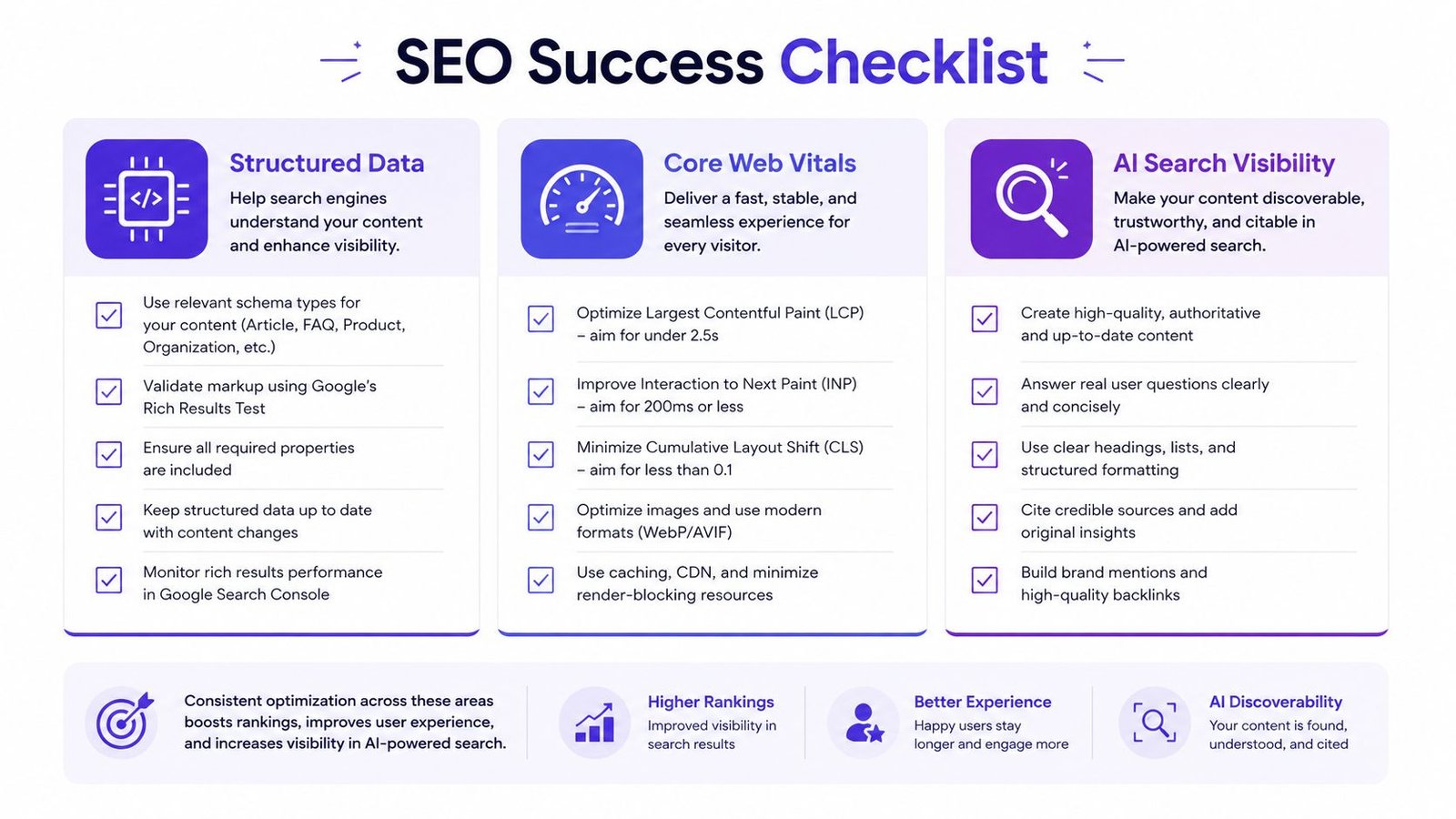
Structured data helps clarify the page entity, but it won't rescue weak or inaccurate content. Use Organization markup for the company identity, SoftwareApplication where the page describes the software, Product for pricing tiers when the page represents those offers, FAQPage for visible support questions, BreadcrumbList for hierarchy, and HowTo for procedural setup content. Markup must match what users can see.
Don't add aggregateRating merely to decorate a homepage. If the page doesn't visibly support the rating and the structured data doesn't accurately represent the page's main subject, the implementation creates compliance and trust problems rather than useful context.
Performance decisions that affect public pages
Recent SaaS SEO guidance treats INP under 200 milliseconds as the pass threshold, as discussed in this technical SaaS SEO guidance. INP has replaced FID operationally, so teams should measure interaction responsiveness rather than focusing only on initial paint.
Prioritize the page templates that drive acquisition:
- LCP: Improve server response, optimize the hero asset, and avoid making the primary headline wait for a large JavaScript bundle.
- CLS: Reserve space for images, consent elements, embedded videos, and support widgets so content doesn't jump.
- INP: Reduce long JavaScript tasks, defer nonessential analytics, and control chat or personalization scripts.
- Hosting: Use caching, edge delivery, and server rendering where they improve real user experience without making content delivery fragile.
The goal isn't a perfect laboratory score. Fix the slow interaction, unstable layout, or delayed primary content that users encounter on pricing and product pages. The authenticated app can have different performance priorities because its users have already crossed the search and acquisition boundary.
Make pages quotable without flattening the experience
AI search visibility requires machine-readable entities, stable page content, descriptive headings, and direct answer blocks. A pricing page should state what each plan includes in accessible HTML. A feature page should define the capability before surrounding it with interactive demonstrations. A setup guide should present the procedure in a clear sequence.
The guide to AI-powered search SEO offers broader context for optimizing content for AI retrieval. Treat Google AI Overviews, ChatGPT, Perplexity, and Gemini as additional reasons to keep important facts server-rendered and consistently expressed, not as a reason to fill every page with speculative schema.
For AI-focused discovery, founders can also evaluate an AI directory submission service alongside technical work. External profiles can reinforce entity understanding, but they work best when the name, product category, description, and links match the public site.
How Directory Profiles and Backlinks Become Technical Signals
A directory profile isn't a substitute for crawlable HTML. It can still contribute to the technical health of a young SaaS brand by giving search engines and retrieval systems more independent places to connect the company name, product category, website, founders, and use case.
This is especially useful when the brand is new or its name overlaps with unrelated entities. A consistent profile on a relevant software marketplace, review platform, startup publication, or industry directory can act as a corroboration node. The value comes from the relationship between sources, not from submitting to every site that accepts a listing.
Backlink and directory sources that act as technical trust signals for SaaS
| Source Type | Signal Sent | Priority |
|---|---|---|
| Relevant software directories | Product category, feature set, and destination URL | High |
| Review platforms | Brand identity, customer-facing product details, and reputation context | High |
| Startup directories | Company stage, launch context, and discoverability | Medium |
| Industry publications | Independent topical association and editorial context | High |
| Product communities | Founder, product, and category relationships | Medium |
| Unlinked brand mentions | Entity corroboration without direct referral value | Selective |
Keep the data consistent across profiles. Use the same official product name, company description, category language, logo, and destination URL. For local or contact information, preserve the same organization details wherever those fields are relevant. Varying the description slightly is fine when it improves fit, but changing the product category from one platform to another creates ambiguity.
Anchor text deserves restraint. A healthy backlink profile includes branded and natural anchors rather than a campaign that forces the same commercial phrase into every listing. Directory links should point to the page that the profile describes, whether that's the homepage, a product page, or a category-specific landing page.
Run a simple external visibility audit
- Search the brand name and inspect which directories already rank.
- Compare those results with competitor profiles on G2, Capterra, Product Hunt, AlternativeTo, and relevant industry sites.
- Record duplicate listings, outdated descriptions, broken links, and incorrect categories.
- Identify reputable gaps where the product has a legitimate reason to appear.
- Track the profile URL, approval status, destination page, and last review date.
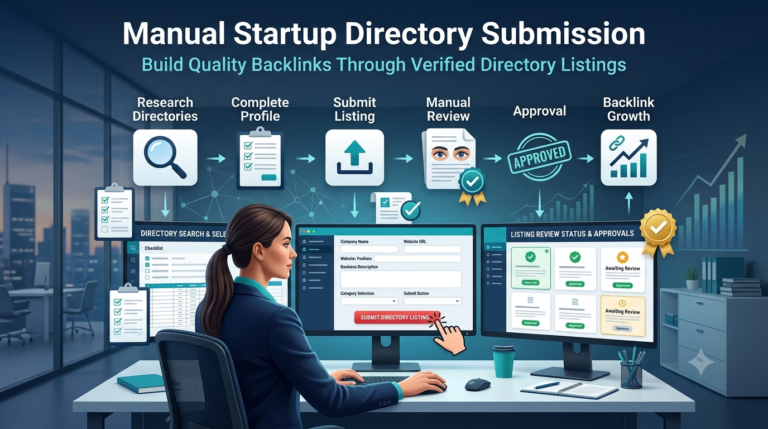
A manual directory submission service such as StartupSubmit's directory submission service can handle repetitive profile creation across relevant startup and software directories. Treat it as an off-page support process, not a replacement for fixing rendering, architecture, or indexation controls on the site itself.
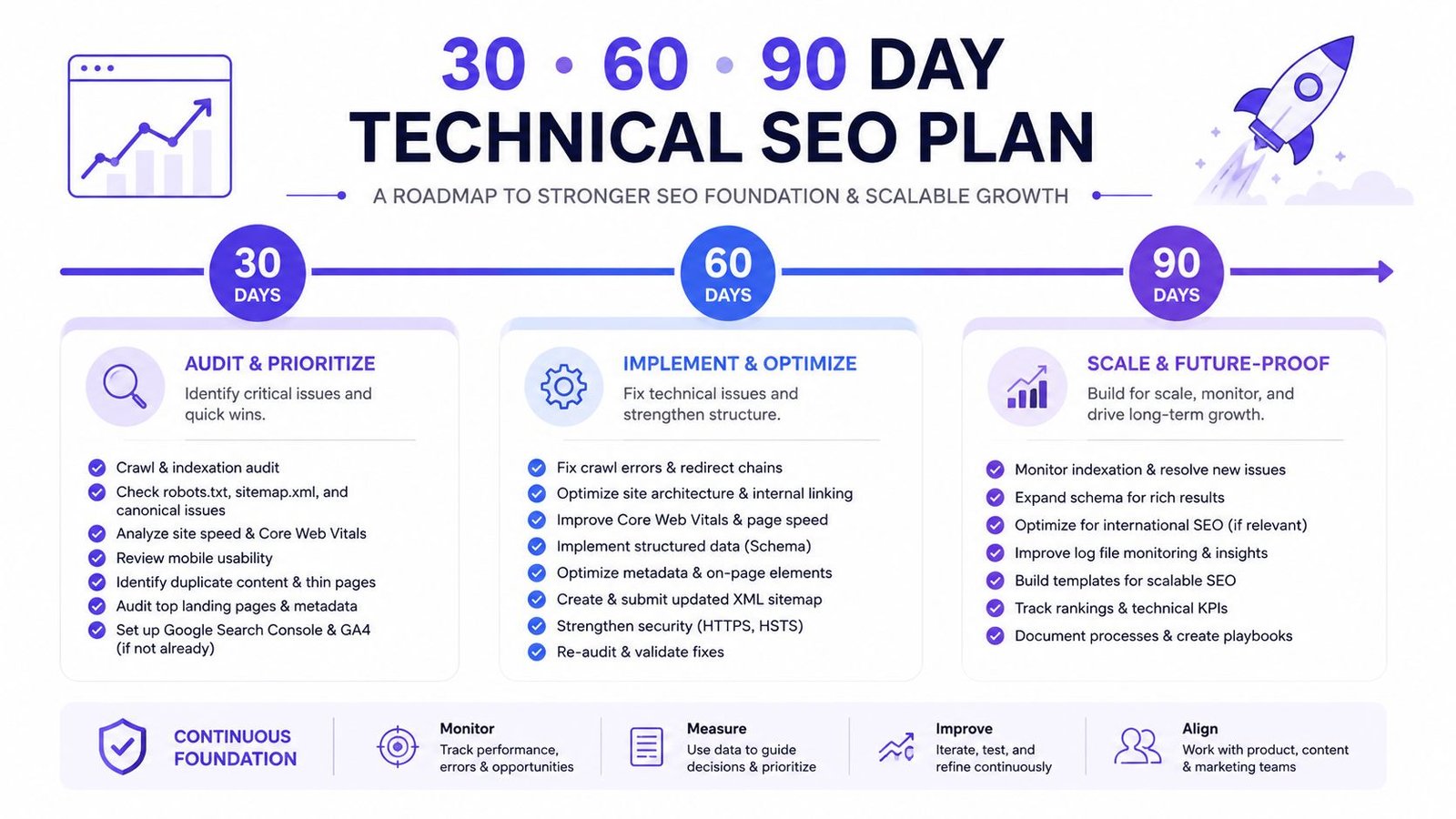
A 30-60-90 Day Technical SEO Plan for SaaS Founders
Technical debt becomes manageable when you sequence it. Founders don't need to fix every warning in Ahrefs or Screaming Frog before publishing another page. They need to remove the constraints that stop Google from finding, rendering, and prioritizing commercial content.
Days 1 to 30 establish control
Start with a crawl of the production domain and every public subdomain. Export status codes, canonical targets, indexation directives, internal links, and URL parameters. Search Google with site: operators for staging hosts, preview domains, app routes, internal search results, and old campaign paths.
Then fix the controls that can hide or dilute the site:
- Robots policy: Remove accidental blocks from public marketing, feature, integration, and docs routes.
- Sitemaps: Keep only canonical, indexable, successful production URLs.
- Canonical rules: Resolve self-referential, parameter, locale, and signup behavior at the template level.
- Redirects: Send moved URLs directly to the final destination and update internal links.
- App boundaries: Require authentication for private routes and establish a separate policy for public app content.
Days 31 to 60 validate what Google sees
Choose the pages closest to revenue, usually pricing, core features, integrations, comparisons, and high-intent solutions. Inspect their raw HTML and rendered HTML. If the main copy or internal links appear only after client-side execution, move those routes to SSR, SSG, or a reliable pre-rendering setup.
Deploy structured data that matches each template. Test the markup with Google's validation tools, then check the visible content against the schema. Measure LCP, CLS, and INP, with particular attention to third-party scripts, consent tooling, chat widgets, and interactive pricing components.
Restructure internal links so commercial hubs receive contextual links from relevant articles and docs. Support content should answer user questions and route readers toward the appropriate product or feature page instead of becoming a disconnected island.
Days 61 to 90 build external corroboration
Once the public site is technically coherent, expand the external entity footprint. Submit to category-relevant software and startup platforms, claim existing review profiles, correct outdated listings, and pursue editorial mentions that describe the product accurately. A SaaS directory submission workflow can fit here when the team needs a structured way to manage profile data, duplicate checks, and placement records.
Use Search Console to monitor indexing and query movement, then compare that data with server logs when available. Watch which routes Googlebot fetches, whether new feature pages are discovered, and whether parameterized or private URLs are receiving unnecessary attention.
Questions founders ask about SaaS technical SEO
What should a SaaS founder fix first?
Fix anything that prevents Google from reaching or rendering pricing, feature, integration, comparison, and solution pages. After that, control duplicate routes and strengthen internal links. Schema and performance improvements matter, but they won't compensate for an empty rendered page or an index full of private app URLs.
Should the SaaS app live on a subdomain?
An authenticated app often benefits from a separate subdomain because it creates a clearer boundary between product functionality and public marketing content. The decision should follow authentication, infrastructure, cookie, and tracking requirements, not a blanket belief that every subdomain is harmful.
Is client-side rendering always bad?
No. CSR is appropriate for authenticated application interfaces where search engines have no reason to access the content. It becomes a problem when teams use the same CSR delivery model for public pages that need to be discovered, understood, and ranked.
How does technical SEO support AI search?
AI systems need accessible content, stable entities, clear page structure, and directly stated product facts. Server-rendered HTML and accurate structured data improve machine readability, but no public source currently provides reliable outcome data showing which exact SaaS page structures get cited most often.
Start with the crawl audit and the pages that create pipeline. In the first month, remove accidental indexation and rendering barriers. In the second, make commercial templates readable and internally connected. In the third, build relevant external profiles and review the crawl behavior monthly as the product keeps shipping.
StartupSubmit offers manual submissions for SaaS and AI startups across relevant startup, software, and review directories, with duplicate checking and a final report of submitted URLs and placement details. If your technical foundation is ready and you need to strengthen external discovery signals, visit StartupSubmit and choose a directory workflow that matches your launch and visibility goals.