
Search Engine Submissions Google Step by Step
Google Search Console expanded its search-performance reporting from 90 days to 16 months when its rebuilt version arrived in January 2018, according to Peter Martin's history of Search Console. That shift captures what founders often miss about submitting a website: the useful work starts after Google receives the URL list.
For a SaaS launch, the outcome isn't a successful submission. It's a set of useful, canonical pages that Google indexes and keeps indexed. Start with that distinction before paying for distribution or submitting your homepage repeatedly.
Table of Contents
- Which Google Submission Method Fits the Job
- Indexing Practices That Keep Pages Eligible
- How to Submit a Site in Search Console
- How to Read Indexing Reports After You Submit
- How External Profiles Help Google Find You
- Frequently Asked Questions About Google Submissions
- Check Indexed URLs Before You Scale Outreach
Which Google Submission Method Fits the Job
Submit a canonical XML sitemap in Search Console, then use Request indexing for a handful of priority URLs. For a site with more than a few public pages, that's the simplest division of work: the sitemap supplies the inventory, while URL Inspection handles individual checks.
Google remains the practical starting point for conventional search visibility, as the StatCounter worldwide search-engine market-share dashboard illustrates. AI answers deserve attention too, but they don't replace the need to make your public website accessible and understandable.
Keep the sequence straight: discovery, crawling, indexing, and serving. Google can know a URL exists without fetching it, fetch it without indexing it, or index it without showing it for a query you care about.
Google submission methods and what they actually do
| Method | Best for | Where you do it | What Google promises |
|---|---|---|---|
| XML sitemap in Search Console | A full set of canonical URLs | Sitemaps report | Hint only; not every URL is crawled or indexed |
| Sitemap line in robots.txt | The same hint if nobody logs into Search Console | robots.txt Sitemap directive | Same hint, no indexing guarantee |
| Search Console API sitemap submit | A repeatable pipeline | Search Console API | Same hint as a manual sitemap submit |
| URL Inspection Request indexing | A few launch URLs | URL Inspection, owner or full user | Crawl consideration; repeats do not speed crawling |
| Internal links from indexed pages | New URLs after the first submit | Your own site | Discovery path only, not a ranking promise |
| External profiles and links | Extra ways crawlers meet the brand | Directories and mentions | Discovery only; separate from ranking |
A sitemap isn't a request to index every listed page. Google calls submission a hint, and its sitemap documentation explains the available submission routes and their limitations.
Choose the method that matches the founder's job
For an indie hacker launching a product, I would inspect the homepage, pricing page, and a core feature page. I wouldn't spend the afternoon requesting every documentation URL individually.
For an engineering team publishing documentation regularly, keep sitemap generation inside the publishing workflow. Manual submission shouldn't become a recurring dependency on whoever remembers the Search Console password.
External distribution belongs in a separate workstream. A startup directory submission service addresses profile placement, not Google's first-party submission process. When evaluating distribution projects, a public reference such as Submify's verified project metrics on Fundl can help frame your due diligence, but project metrics aren't evidence that your own pages will index.
A submission receipt confirms an action. It doesn't confirm a search outcome.
Indexing Practices That Keep Pages Eligible
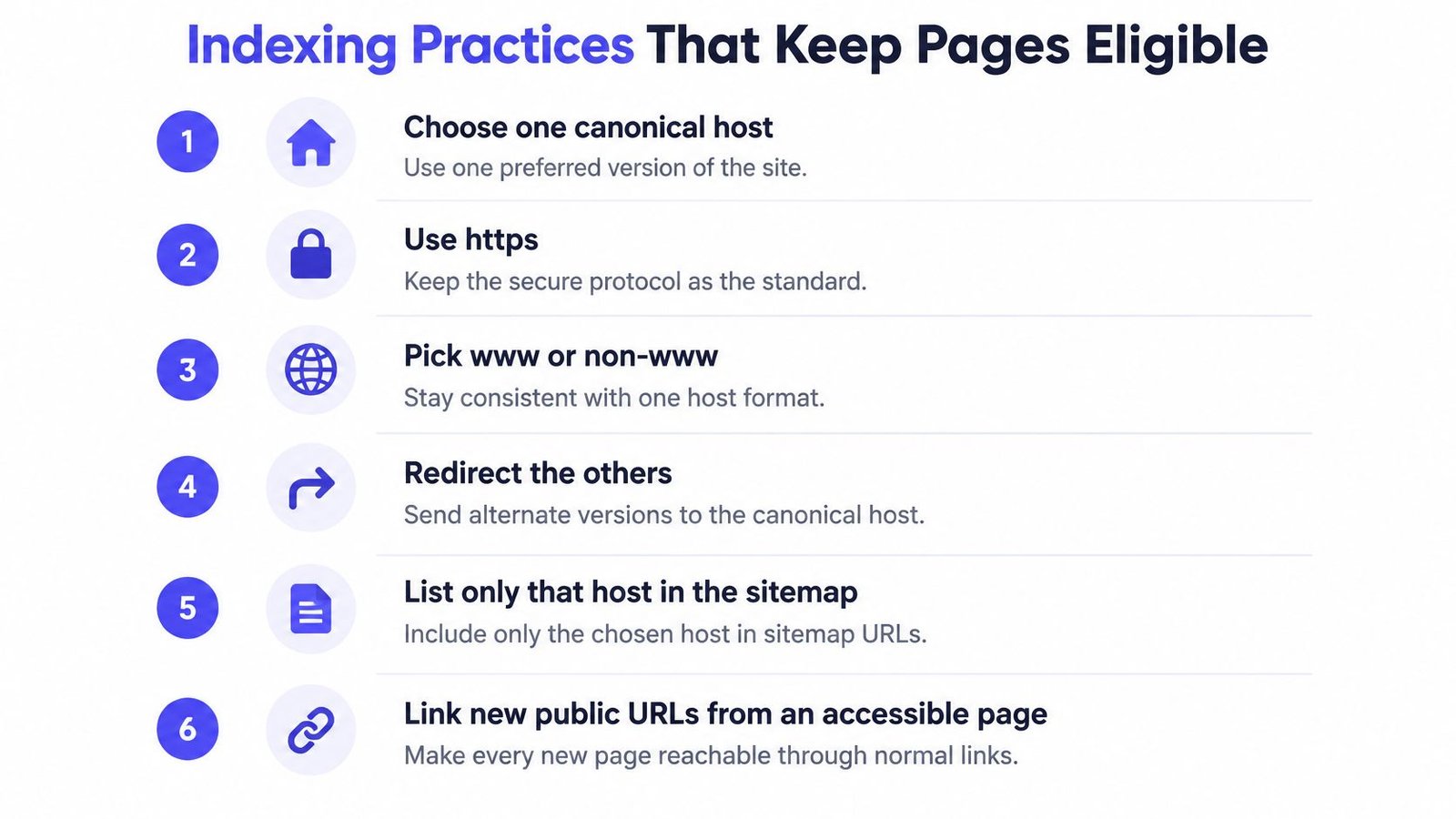
A submission depends on the page being worth accessing and technically eligible to appear. Start with one canonical host, use HTTPS, choose either www or non-www, and redirect alternate versions to the preferred version.
Keep only preferred URLs in the sitemap. Don't ask Google to discover one version while your navigation and canonical tags recommend another.
Google describes an index containing hundreds of billions of webpages, larger than 100,000,000 gigabytes, in its explanation of how Search works. Its crawlers discover URLs through links and sitemap lists, then analyze text, titles, images, and other information. A new startup needs clear, useful pages, not merely a technically valid file.
Give every public page a distinct job
Write a unique title and define the page's purpose in a sentence a prospective buyer would understand. “Explains how developers export audit logs” is a purpose. “Targets another variation of our main keyword” isn't.
Say an AI founder publishes separate pages for meeting notes, meeting summaries, and AI meeting recaps. If each page contains the same pitch, merge them into a complete resource unless the workflows truly differ.
Apply the same judgment to tag archives and template collections. An empty category page doesn't become useful because your content management system generated a URL.
- Connect new pages: Make linking from an already indexed, accessible page part of the publishing checklist, ideally on publication day.
- Exclude private interfaces: Keep logged-in screens, app shells, preview tokens, and internal search results outside the sitemap.
- Control duplicates: Don't fill the inventory with parameterized versions of the same content.
- Remove launch leftovers: Check production for staging crawl restrictions and unintended noindex directives.
Separate eligibility from promotion
A directory submission workflow can distribute your business information, but it can't repair a production page that tells crawlers to stay out. Fix access before spending founder time on outreach.
Check the rendered page, not just the content editor. A title saved in your CMS doesn't help if the public URL returns an error or displays an incomplete application shell.
Use the stranger test before adding a URL to the plan: can someone without an account open it, read a complete answer, and reach it through normal navigation from the homepage? If not, repair the experience or leave that URL out.
How to Submit a Site in Search Console
Use a business-controlled account and make the setup reproducible. A founder's personal login shouldn't be the only route to a core marketing asset.
The sequence below follows the ownership, accessibility, and inspection checks described in Google's recrawl guidance. Owner or full-user permission is required to request indexing, so resolve access before launch day.
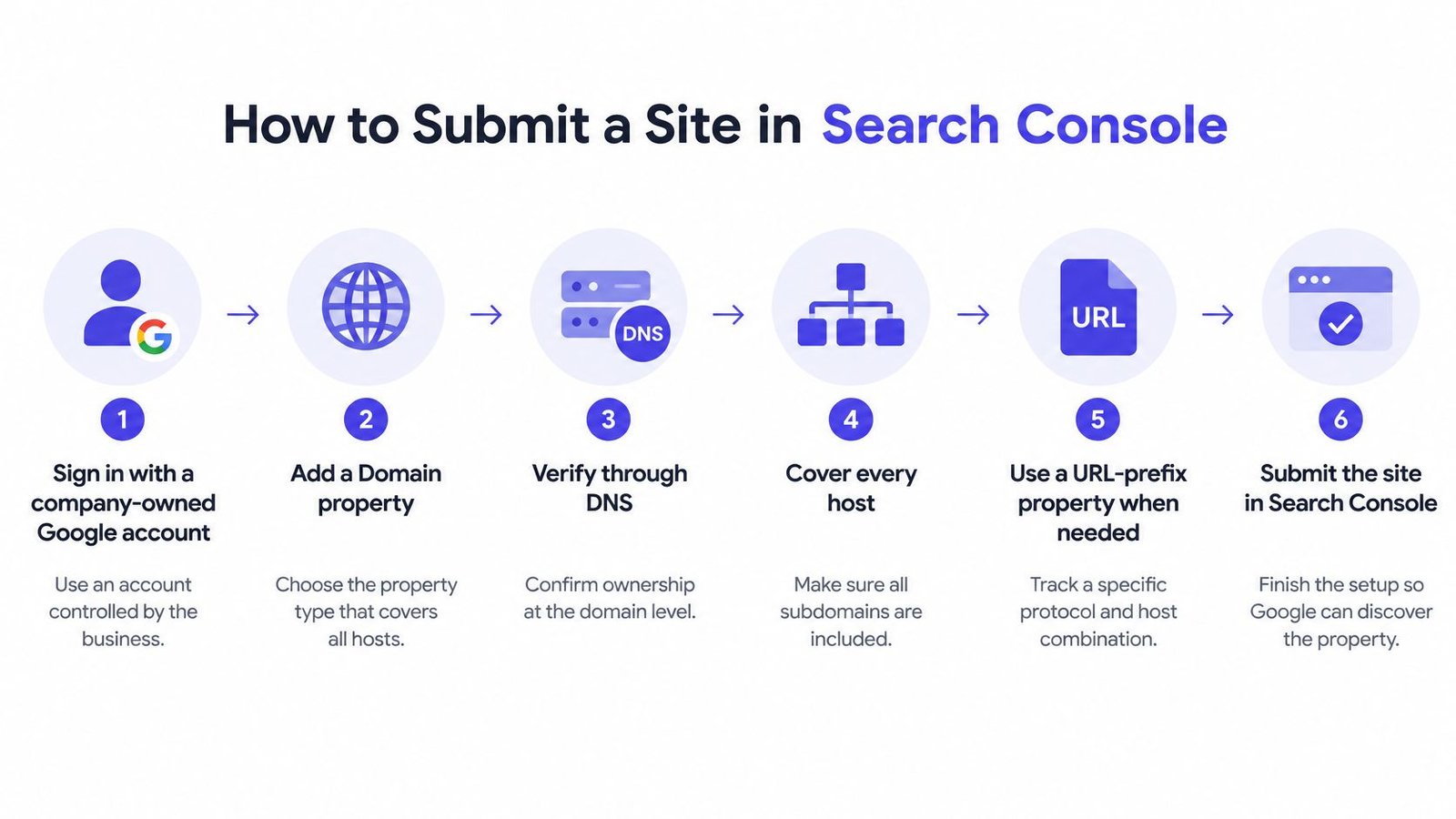
Complete the setup in a controlled order
Add the property using a company-owned Google account. In Search Console, open the property selector and choose Add property. Choose a Domain property when you have DNS access, so your view covers the domain's hosts and protocols. Use a URL-prefix property when domain-level verification isn't available.
Finish ownership verification before handing off the task. For a Domain property, follow Search Console's DNS verification prompts with whoever manages the domain. Confirm that the marketer responsible for URL Inspection has owner or full-user access, rather than assuming everyone invited to the property has the same permissions.
Audit the canonical destination. Open the production URL and verify a successful response, crawl access, no unintended noindex, and the intended canonical. Confirm there's a normal internal link to it. For the homepage and principal product pages, navigation should make that path obvious.
Publish an XML sitemap containing canonical, indexable URLs. Open Sitemaps, enter the sitemap location, and select Submit. Declare that same sitemap in robots.txt as well. For a straightforward launch, a single clean inventory is easier to maintain than separate files created by competing plugins.
Inspect the pages that matter commercially. Paste the homepage URL into the top inspection bar, review the result, and use Test live URL when you need to check the current page. Repeat for pricing and a representative product page. When eligible, select Request indexing once for each priority URL.
Record what you submitted. Save the date, property type, sitemap location, submitted URL count, and priority pages in the launch checklist. That baseline lets you distinguish a publishing problem from a later change in Google's treatment of the site.
Catch launch mistakes before interpreting reports
The most expensive errors are often leftovers from a correct staging setup. A staging host in the sitemap sends Google toward the wrong inventory; a pre-launch noindex excludes the finished page; a canonical pointing to a dead preview URL creates conflicting instructions.
Launch check: Inspect the live production URL, not the preview link your team used during approval.
Transactional LLC's walkthrough of Google Search Console for service businesses offers another setup reference, particularly when the person managing the property isn't a developer. Keep verification, ownership, and the submitted inventory documented regardless of business model.
Once submission is complete, move to diagnosis. Repeated clicks don't replace reading what Google reports.
How to Read Indexing Reports After You Submit
A sitemap can process successfully while important pages remain outside the index. Success describes the sitemap operation, not the fate of every URL inside it.
Use the Page indexing report for patterns across the site, then inspect individual examples. Compare the eligible URLs in your sitemap with the indexed population, using sitemap-filtered reporting where available rather than treating the submitted count as an indexed count.
For commercially important pages, URL Inspection provides the more useful individual check. Server logs add another perspective: they help establish whether Googlebot requested a URL and what the server returned.
Search Console indexing statuses and the fix
| Status | What it means | What to do next |
|---|---|---|
| Crawled – currently not indexed | Fetched, then not stored | Strengthen uniqueness and internal links, then wait for a recrawl |
| Discovered – currently not indexed | Known, not yet crawled | Keep the sitemap current and link the URL from an indexed page |
| URL is unknown to Google | No discovery recorded in the inspected result | Submit the sitemap or inspect and request indexing once |
| Blocked by robots.txt | Crawl is disallowed | Remove the disallow if this URL should be indexed |
| Excluded by noindex | Page asks to stay out | Remove noindex on the canonical production URL |
| Duplicate, Google chose different canonical | Another URL is preferred | Make tags, sitemaps, and links agree on one URL |
| Page with redirect | This URL is not the destination | Inspect the final URL instead of the redirecting one |
Crawled, currently not indexed doesn't identify a single proven cause. Thin content, duplication, and weak internal connections are reasonable places to investigate, but the status itself doesn't tell you which explanation applies.
Likewise, Discovered, currently not indexed isn't a command to resubmit. Check whether the URL belongs in your inventory, whether useful pages link to it, and whether the server can handle crawling reliably.
Diagnose a page class rather than chasing isolated URLs
Say your product pages index but your integration pages don't. Inspect representative integration URLs and compare their content, canonical tags, internal links, and server responses with the successful product pages.
If every integration page contains the same generic copy with a different tool name, the next task is editorial. Add actual setup requirements, supported actions, limitations, and a useful workflow example, or consolidate the pages.
A soft 404 needs a different response. Check whether the URL shows an empty state, unavailable item, or near-empty page despite returning a successful response; either publish a complete resource or return the appropriate removal response.
- Record the change: Keep the affected page class and the specific fix together.
- Confirm a later crawl: Don't judge a revised page using a result that predates the revision.
- Separate exclusions: Intentional noindex pages shouldn't inflate your eligible-page denominator.
The useful management question is whether a page class becomes indexed and stays that way after Google revisits it. Google doesn't publish a universal indexing success rate, so don't turn an agency's preferred benchmark into a promised result.
How External Profiles Help Google Find You
A directory profile deserves effort when a buyer could reasonably use it to evaluate your product. Raw listing count is a poor substitute for category fit, a useful description, and an accessible profile page.
Google's ranking-systems guide describes primarily page-level evaluation, alongside site-wide signals, and identifies link analysis, including PageRank, among its systems. That doesn't mean every directory backlink has equal value or that buying more submissions produces a predictable ranking change.
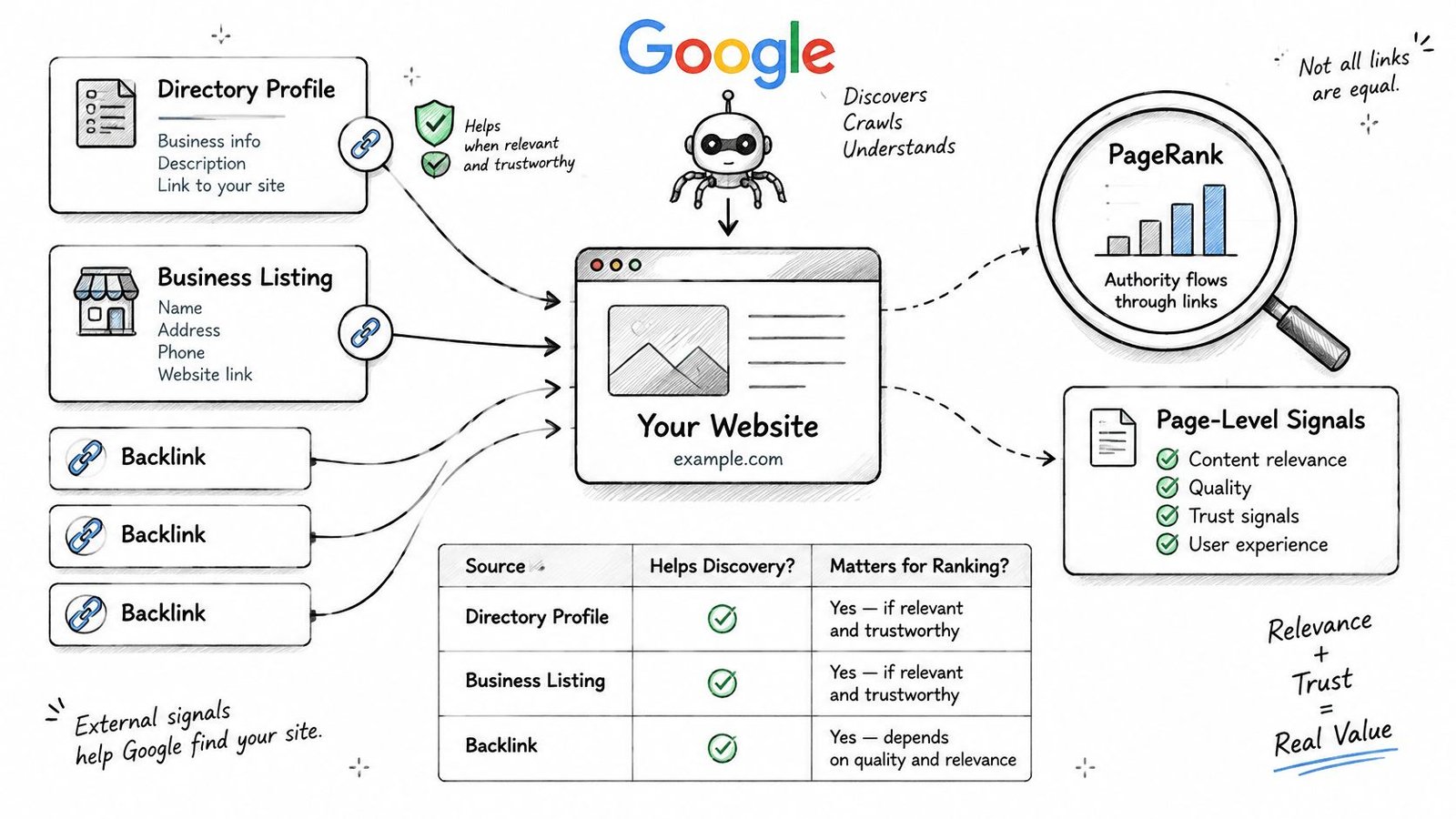
Choose profiles buyers can actually use
For a SaaS product, consider whether G2, Capterra, Product Hunt, or AlternativeTo matches how prospective customers research the category. A developer utility and an enterprise procurement platform shouldn't automatically receive the same submission list.
Evaluate each destination before preparing the profile:
- Category fit: Can the platform accurately classify the product?
- Public accessibility: Can someone open the listing without signing in?
- Editorial context: Does the platform review submissions and maintain useful categories?
- Copy quality: Does the description explain your actual user, workflow, and limitations?
Manual submissions to curated, editorially reviewed platforms carry effectively zero risk of Google penalties. That narrow statement doesn't extend to link farms, spam networks, or manipulated bulk-link campaigns, and low penalty risk isn't a promise of ranking benefit.
For businesses with a genuine local presence, a local citation workflow serves a different purpose from a software comparison profile. Keep the business identity accurate rather than forcing a remote-only product into irrelevant local categories.
Treat AI visibility as a separate access check
AI search optimization and LLM SEO start with retrievable public information, not a special submission badge. For ChatGPT search, the crawler-access guidance identifies OAI-Searchbot access and hosting or CDN rules as relevant to crawl eligibility; search responses may include citations users can open.
Check that access separately from Googlebot. Publish clear descriptions, feature documentation, and factual comparisons that an external system can interpret without navigating a private app.
Google AI Overview visibility and ChatGPT visibility shouldn't be sold as guaranteed extensions of a directory campaign. StartupSubmit cannot control whether any search engine or AI assistant mentions, recommends, or cites a business.
Fix your own pages first. Then use external profiles to create accurate, useful places where buyers and crawlers can encounter the brand.
Frequently Asked Questions About Google Submissions
Does an indexed page guarantee rankings?
No. Indexing makes a page eligible to appear, while relevance, quality, links, and the query influence whether Google serves it. Evaluate indexing and search performance separately so a technically successful launch doesn't get confused with proven demand.
How long should a founder wait before judging a fix?
Wait until Google has recrawled the affected URL, then check the updated result. There's no universal deadline that makes an unchanged inspection result meaningful; use crawl information rather than an arbitrary calendar reminder.
Do I need a sitemap for a five-page site?
Not strictly, if ordinary links make every public page discoverable. A sitemap still provides a clean inventory and helps you keep deliberate exclusions separate from pages you want indexed.
Does Google indexing affect ChatGPT visibility?
Not directly. Check the relevant search crawler's permissions and your CDN's handling separately, and don't assume inclusion in one index establishes eligibility everywhere else.
Should I promote a page while indexing is unresolved?
You can still send people to a useful, working page. Distribution through relevant communities, Reddit marketing, or LinkedIn serves audience acquisition rather than technical indexing repair.
For example, ViralBrain's AI LinkedIn viral content generator can support preparing social content, but a publishing tool isn't an indexing mechanism. Keep promotional experiments and technical fixes in different tracking rows so you can tell what each action achieved.
Check Indexed URLs Before You Scale Outreach
Give the launch week a fixed sequence. The aim isn't to keep everyone busy in Search Console; it's to establish a clean inventory, remove genuine blockers, and avoid confusing repeated submissions with progress.
Establish the baseline on launch day
Verify the property, finish the canonical audit, submit the sitemap, and inspect the homepage, pricing page, and core product page. Save their initial status and the production URLs your team expects Google to retain.
Assign ownership for exclusions. Engineering should know who handles access rules and response errors, while marketing owns whether the public content answers a distinct buyer question.
Use the rest of the week for diagnosis
Open the Page indexing report for a focused review rather than refreshing it throughout the day. Fix unintended robots or noindex exclusions, document the change, and leave correctly submitted URLs alone.
After the next recrawl, compare outcomes across documentation, blog posts, and product pages. When expansion depends on a repeated page template, resolve that template's indexing problems before publishing the next batch.
For outreach planning, a shortlist of the best startup directories is more useful than an unfiltered spreadsheet. Prioritize places that match your category and have room for a substantive profile.
Once the Search Console work is complete, StartupSubmit can take over the directory handoff. We manually submit SaaS products to 220+ high-authority software directories, including G2, Capterra, Product Hunt, SaaSHub, and AlternativeTo; every submission is made by hand by a team of 20 SEO professionals, and we never use bots.
Skip that handoff if your company name, address, or phone number is about to change. It's also unsuitable when you need immediate Google Maps rankings or guaranteed organic rankings. No service can make Google index a blocked page or force an AI answer to cite your company.
Measure the outcome: Indexed canonical URLs divided by eligible canonical URLs, split by page type and checked again after recrawling.
Use that indexed share to decide whether to repair the current inventory or expand it. A growing submission count alone isn't a reason to scale.
StartupSubmit handles manual submissions to curated startup and software directories once your website is ready for discovery. Visit StartupSubmit to hand off profile creation while your team keeps ownership of Search Console, page quality, and indexed-share tracking.